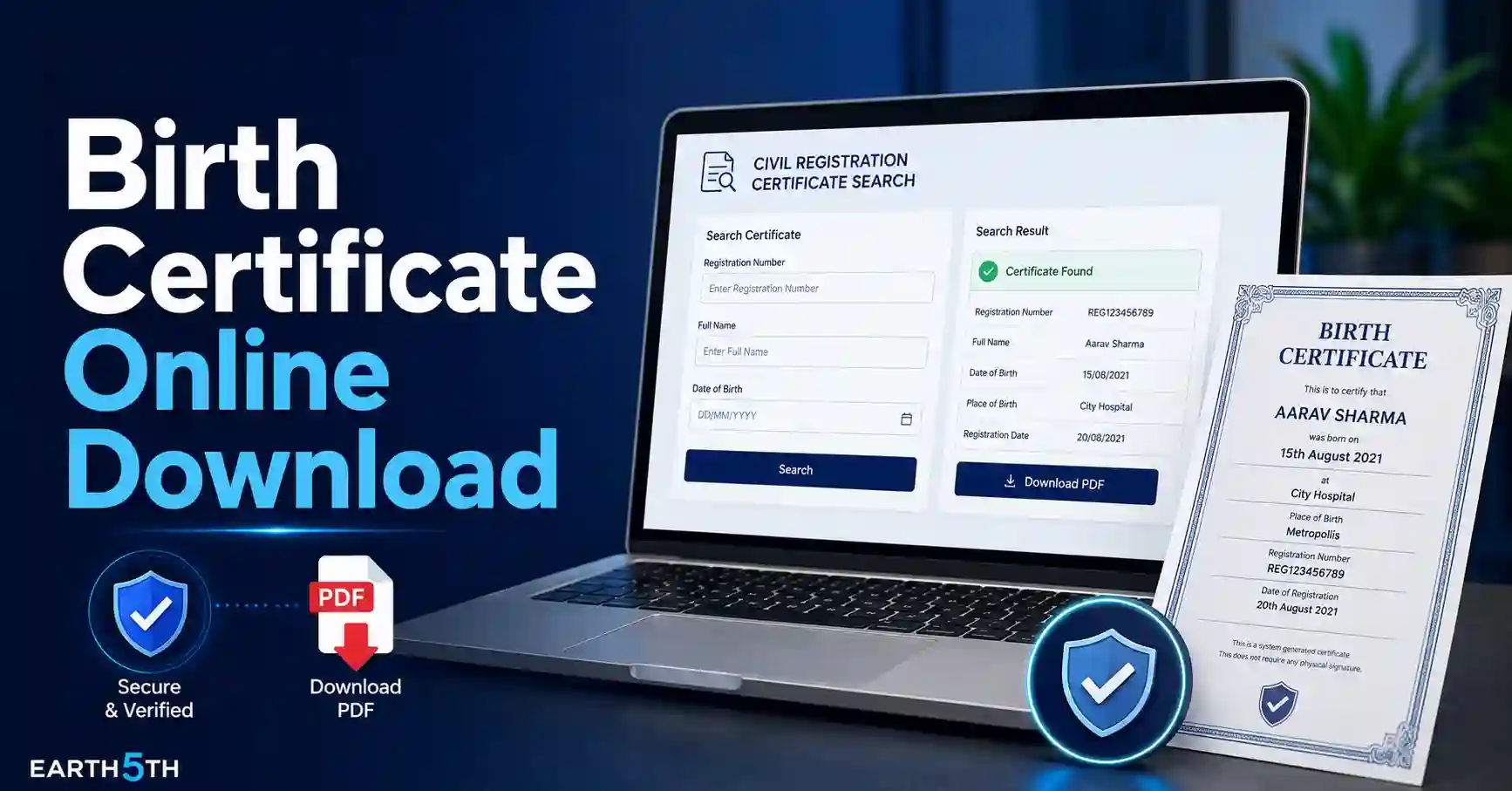
കേരളത്തിൽ ജനന സർട്ടിഫിക്കറ്റ് (Birth Certificate) ആവശ്യമായി വരുമ്പോൾ പണ്ടത്തെപ്പോലെ പഞ്ചായത്ത് ഓഫീസുകളിലോ മുനിസിപ്പാലിറ്റികളിലോ നേരിട്ട് പോയി വരിനിൽക്കേണ്ട ആവശ്യമില്ല. ജനനം നേരത്തെ തന്നെ ഔദ്യോഗികമായി രജിസ്റ്റർ ചെയ്തിട്ടുണ്ടെങ്കിൽ, തദ്ദേശ സ്വയംഭരണ വകുപ്പിന്റെ (LSGD) പുതിയ ഡിജിറ്റൽ സംവിധാനമായ K-SMART വഴി നിങ്ങൾക്ക് വീട്ടിലിരുന്ന് തന്നെ സർട്ടിഫിക്കറ്റ് ഓൺലൈനായി ഡൗൺലോഡ് ചെയ്യാം.
ഈ ഗൈഡിൽ, ഇതിനകം രജിസ്ട്രേഷൻ പൂർത്തിയായ ഒരു ജനന സർട്ടിഫിക്കറ്റ് എങ്ങനെ ഫോണിലോ കമ്പ്യൂട്ടറിലോ സൗജന്യമായി സെർച്ച് ചെയ്ത് ഡൗൺലോഡ് ചെയ്യാം എന്ന് വളരെ വ്യക്തമായി വിശദീകരിക്കുന്നു. പുതിയ ജനനം രജിസ്റ്റർ ചെയ്യുന്നതിനോ, സർട്ടിഫിക്കറ്റിൽ പേര് ചേർക്കുന്നതിനോ ഉള്ള വഴികൾ ഇതിൽ നിന്നും തികച്ചും വ്യത്യസ്തമാണ്. അത്തരം അബദ്ധങ്ങൾ ഒഴിവാക്കി കൃത്യമായ സർട്ടിഫിക്കറ്റ് എടുക്കുന്നതിനുള്ള പ്രാക്ടിക്കൽ സ്റ്റെപ്പുകൾ താഴെ നൽകുന്നു.
എന്താണ് K-SMART പ്ലാറ്റ്ഫോം?
കേരളത്തിലെ തദ്ദേശ സ്വയംഭരണ വകുപ്പ് (LSGD) ഉപയോഗിക്കുന്ന ഏറ്റവും പുതിയ ഇന്റഗ്രേറ്റഡ് ഡിജിറ്റൽ ഗവേണൻസ് പ്ലാറ്റ്ഫോമാണ് K-SMART. സിവിൽ രജിസ്ട്രേഷൻ (ജനനം, മരണം, വിവാഹം), പ്രോപ്പർട്ടി ടാക്സ്, ബിൽഡിംഗ് പെർമിറ്റ്, ട്രേഡ് ലൈസൻസ് തുടങ്ങിയ നിരവധി സേവനങ്ങൾ ഒരൊറ്റ കുടക്കീഴിൽ കൊണ്ടുവരിക എന്നതാണ് ഇതിന്റെ ലക്ഷ്യം. തദ്ദേശ സ്ഥാപനങ്ങളുടെ വിവിധ ആവശ്യങ്ങൾക്കായി ഉപയോഗിക്കുന്ന K-SMART പ്ലാറ്റ്ഫോമിലെ മറ്റ് പ്രധാന ഓൺലൈൻ സേവനങ്ങൾ പോലെ തന്നെ ജനന സർട്ടിഫിക്കറ്റ് ഡൗൺലോഡ് ചെയ്യുന്നതും ഇപ്പോൾ വളരെ ലളിതമാണ്.
തുടക്കത്തിൽ മുനിസിപ്പാലിറ്റികളിലും കോർപ്പറേഷനുകളിലുമാണ് ഇത് നടപ്പിലാക്കിയതെങ്കിലും, 2025 ഏപ്രിൽ 10 മുതൽ ഗ്രാമപഞ്ചായത്തുകളിലേക്കും ഇത് വ്യാപിപ്പിച്ചിട്ടുണ്ട്. 2026-ലെ ഔദ്യോഗിക വിവരങ്ങൾ പ്രകാരം കേരളത്തിലെ 941 ഗ്രാമപഞ്ചായത്തുകളിലും, 152 ബ്ലോക്ക് പഞ്ചായത്തുകളിലും, 14 ജില്ലാ പഞ്ചായത്തുകളിലും ഈ സിസ്റ്റം നിലവിൽ ലഭ്യമാണ്.
സർട്ടിഫിക്കറ്റ് ഡൗൺലോഡ് ചെയ്യാൻ തുടങ്ങുന്നതിന് മുമ്പ്
സർട്ടിഫിക്കറ്റ് ഡൗൺലോഡ് ചെയ്യണമെങ്കിൽ ആ ജനനം ബന്ധപ്പെട്ട തദ്ദേശ സ്ഥാപനത്തിൽ ഔദ്യോഗികമായി രജിസ്റ്റർ ചെയ്തിട്ടുണ്ടാവണം. ഓൺലൈനിൽ സെർച്ച് ചെയ്യുന്നതിന് മുമ്പ് താഴെ പറയുന്ന വിവരങ്ങൾ നിങ്ങളുടെ കയ്യിലുണ്ടെന്ന് ഉറപ്പാക്കുക:
-
ജനന തീയതി (Date of Birth)
-
ജനനം രജിസ്റ്റർ ചെയ്ത ജില്ല
-
ബന്ധപ്പെട്ട തദ്ദേശ സ്ഥാപനം (Local Body)
-
തദ്ദേശ സ്ഥാപനത്തിന്റെ തരം (പഞ്ചായത്ത് / മുനിസിപ്പാലിറ്റി / കോർപ്പറേഷൻ)
-
കുട്ടിയുടെ ലിംഗം (Sex)
-
അമ്മയുടെ പേര് ഇംഗ്ലീഷിൽ (Mother’s Name)
സെർച്ച് ചെയ്യാൻ അമ്മയുടെ മുഴുവൻ പേരും വേണമെന്നില്ല. പേരിന്റെ ആദ്യത്തെ മൂന്ന് ഇംഗ്ലീഷ് അക്ഷരങ്ങൾ കൃത്യമായി നൽകിയാലും മതിയാകും. സർട്ടിഫിക്കറ്റ് ഡൗൺലോഡ് ചെയ്യാൻ ആധാർ കാർഡോ, ഫോട്ടോയോ, ആശുപത്രി രേഖകളോ ഒന്നും അപ്ലോഡ് ചെയ്യേണ്ട ആവശ്യമില്ല.
Birth Certificate Online Download: Step-by-Step ഗൈഡ്
തെറ്റുകൾ കൂടാതെ സർട്ടിഫിക്കറ്റ് കണ്ടെത്താനും ഡൗൺലോഡ് ചെയ്യാനും താഴെ പറയുന്ന 8 സ്റ്റെപ്പുകൾ കൃത്യമായി ഫോളോ ചെയ്യുക.
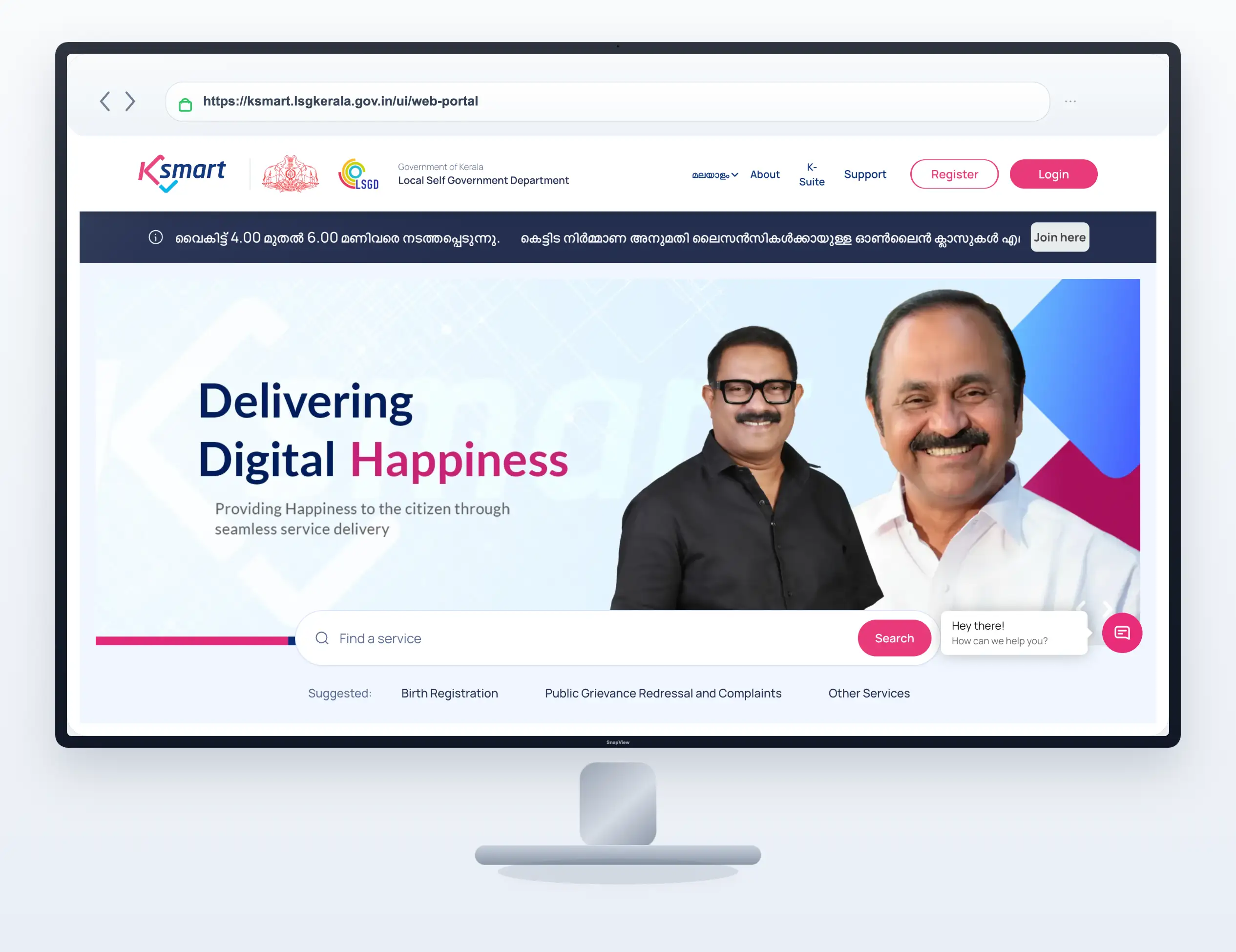
Step 1: ഔദ്യോഗിക K-SMART പോർട്ടൽ തുറക്കുക
നിങ്ങളുടെ മൊബൈൽ ബ്രൗസറിലോ കമ്പ്യൂട്ടറിലോ കേരള സർക്കാരിന്റെ ഔദ്യോഗിക K-SMART വെബ്സൈറ്റ് തുറക്കുക. അഡ്രസ്സ് ബാറിൽ ksmart.lsgkerala.gov.in എന്ന് തന്നെയാണെന്ന് ഉറപ്പുവരുത്തുക. ഗൂഗിളിൽ സെർച്ച് ചെയ്യുമ്പോൾ കാണുന്ന പരസ്യങ്ങളിലോ വ്യാജ സർട്ടിഫിക്കറ്റ് വെബ്സൈറ്റുകളിലോ കയറി വ്യക്തിഗത വിവരങ്ങൾ നൽകാതിരിക്കാൻ പ്രത്യേകം ശ്രദ്ധിക്കണം.
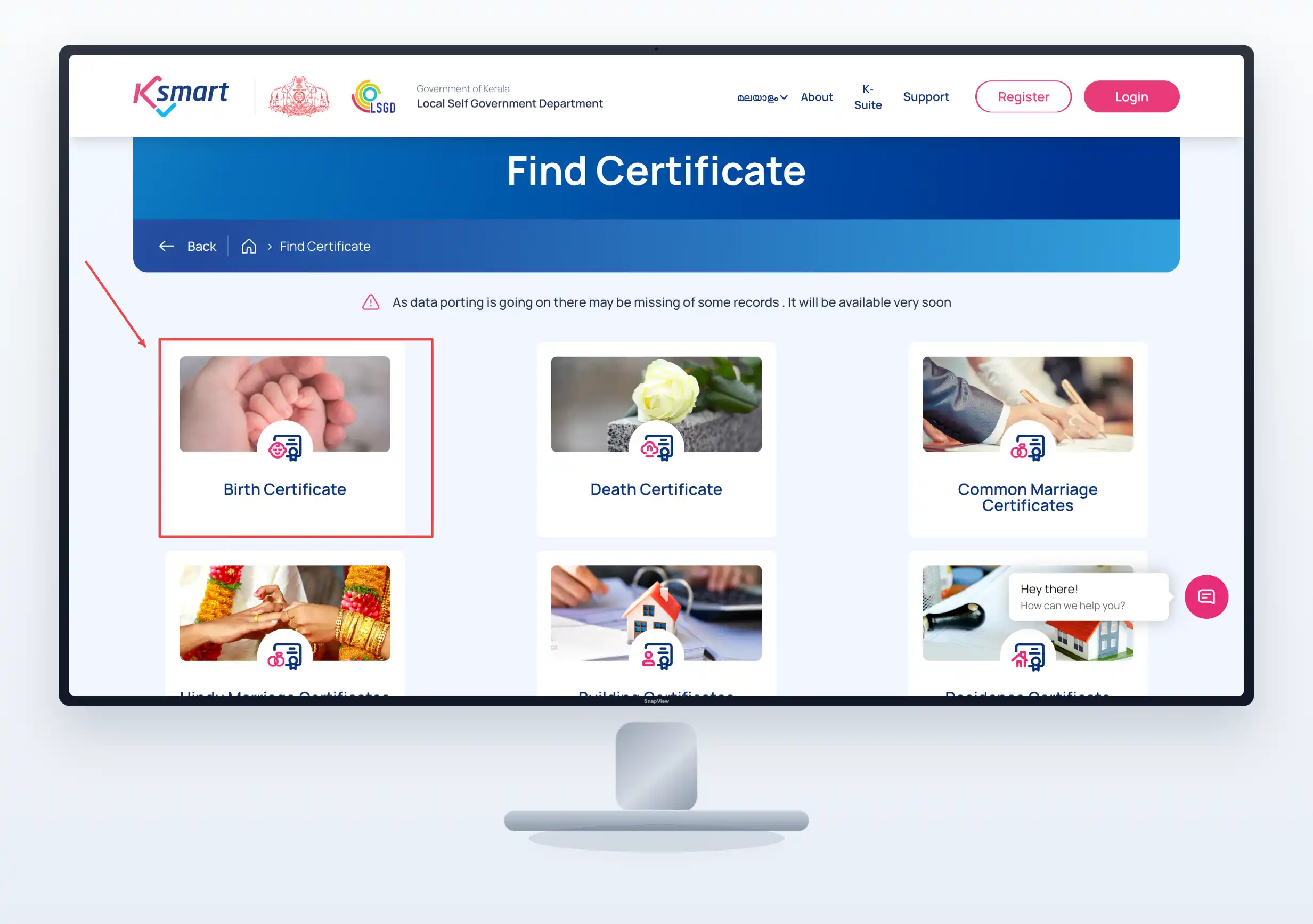
Step 2: Birth Certificate സർവീസ് തിരഞ്ഞെടുക്കുക
വെബ്സൈറ്റിലെ പ്രധാന മെനുവിൽ നിന്നും ‘Birth Registration’ എന്ന കാറ്റഗറി തിരഞ്ഞെടുക്കുക. അതിൽ ക്ലിക്ക് ചെയ്യുമ്പോൾ താഴെ പറയുന്ന ഓപ്ഷനുകൾ കാണാൻ കഴിയും:
-
Birth Certificate
-
Birth New Registration
-
Birth Name Inclusion
-
Birth Name Correction
നിങ്ങൾക്ക് സർട്ടിഫിക്കറ്റ് ഡൗൺലോഡ് ചെയ്യാൻ മാത്രമാണ് ആവശ്യമെങ്കിൽ ഇതിൽ നിന്നും ‘Birth Certificate’ എന്ന ഓപ്ഷൻ മാത്രം തിരഞ്ഞെടുക്കുക.
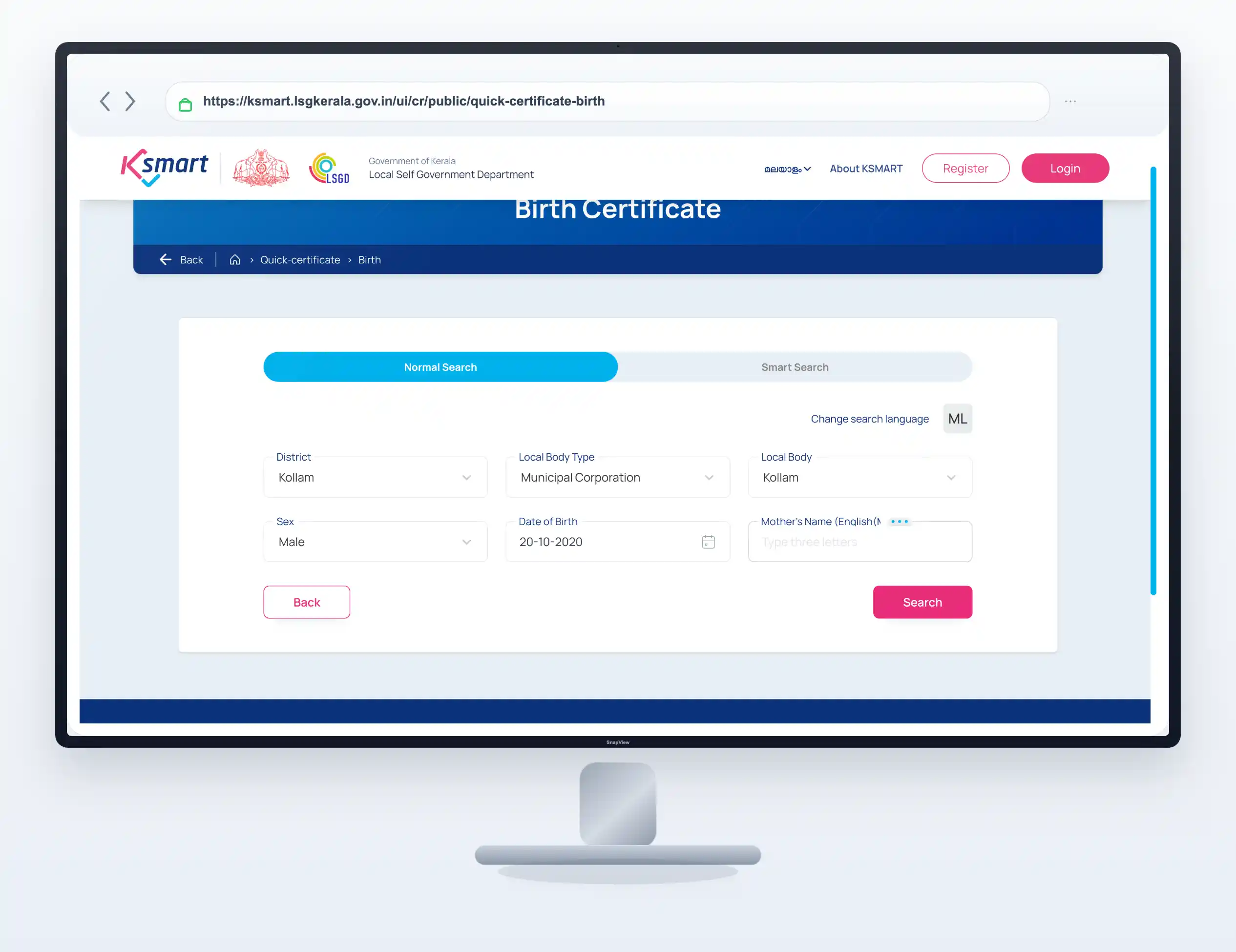
Step 3: തദ്ദേശ സ്ഥാപനം (Local Body) കൃത്യമായി നൽകുക
ജനനം നടന്ന സ്ഥലമല്ല, മറിച്ച് സർട്ടിഫിക്കറ്റ് എവിടെയാണോ രജിസ്റ്റർ ചെയ്തിട്ടുള്ളത് ആ തദ്ദേശ സ്ഥാപനമാണ് ഇവിടെ നൽകേണ്ടത്.
ഉദാഹരണം: നിങ്ങളുടെ സ്വന്തം വീട് ഒരു ഗ്രാമപഞ്ചായത്തിലാകാം, എന്നാൽ കുട്ടി ജനിച്ചത് എറണാകുളം കോർപ്പറേഷൻ പരിധിയിലുള്ള ഒരു ആശുപത്രിയിലാണെങ്കിൽ, ആ ജനനം രജിസ്റ്റർ ചെയ്യപ്പെടുന്നത് എറണാകുളം കോർപ്പറേഷനിലാണ്. അതിനാൽ ഇവിടെ ‘Municipal Corporation’ എന്ന് തിരഞ്ഞെടുത്ത് ജില്ലയും സ്ഥാപനവും കൃത്യമായി നൽകുക.
Step 4: ജനന തീയതി (Date of Birth) എന്റർ ചെയ്യുക
സർട്ടിഫിക്കറ്റിൽ രജിസ്റ്റർ ചെയ്തിരിക്കുന്ന ജനന തീയതി കലണ്ടറിൽ നിന്നും കൃത്യമായി തിരഞ്ഞെടുക്കുക. ദിവസം, മാസം, വർഷം എന്നിവയിൽ ചെറിയൊരു തെറ്റ് വന്നാൽ പോലും സിസ്റ്റം റെക്കോർഡ് കാണിക്കില്ല. ഏകദേശ തീയതി വെച്ച് സെർച്ച് ചെയ്യുന്നതിന് പകരം പഴയ ആശുപത്രി രേഖകളോ ഡിസ്ചാർജ് സമ്മറിയോ നോക്കി തീയതി ഉറപ്പാക്കുക.
Step 5: അമ്മയുടെ പേര് (Mother’s Name) നൽകുക
സർട്ടിഫിക്കറ്റ് സെർച്ച് ചെയ്യാൻ അമ്മയുടെ പേര് നിർബന്ധമാണ്. രജിസ്ട്രേഷൻ സമയത്ത് നൽകിയ ഇംഗ്ലീഷ് സ്പെല്ലിംഗ് തന്നെ ഇവിടെ നൽകണം. മലയാളത്തിലെ പേര് സ്വന്തമായി ഇംഗ്ലീഷിലേക്ക് തർജ്ജമ ചെയ്ത് ടൈപ്പ് ചെയ്യുമ്പോൾ പലപ്പോഴും സ്പെല്ലിംഗ് തെറ്റാൻ സാധ്യതയുണ്ട്. കൃത്യമായ സ്പെല്ലിംഗ് സംശയമുണ്ടെങ്കിൽ പേരിന്റെ ആദ്യത്തെ മൂന്ന് ഇംഗ്ലീഷ് അക്ഷരങ്ങൾ മാത്രം (ഉദാഹരണത്തിന് ‘LAKSHMI’ എന്നാണെങ്കിൽ ‘LAK’ എന്ന് മാത്രം) ടൈപ്പ് ചെയ്ത് സെർച്ച് ചെയ്യുക.
Step 6: വിവരങ്ങൾ നൽകി സെർച്ച് ചെയ്യുക
എല്ലാ കോളങ്ങളും പൂരിപ്പിച്ച ശേഷം താഴെയുള്ള ‘Search’ ബട്ടൺ ക്ലിക്ക് ചെയ്യുക. നിങ്ങൾ നൽകിയ വിവരങ്ങളുമായി മാച്ച് ചെയ്യുന്ന ജനന റെക്കോർഡുകൾ സ്ക്രീനിൽ താഴെയായി ലിസ്റ്റ് ചെയ്യും. ഒരേ തീയതിയിൽ ജനിച്ച ഒന്നിലധികം കുട്ടികളുടെ ലിസ്റ്റ് വന്നിട്ടുണ്ടെങ്കിൽ മാതാപിതാക്കളുടെ പേരും മറ്റ് വിവരങ്ങളും ശ്രദ്ധയോടെ പരിശോധിച്ച് നിങ്ങളുടെ കുട്ടിയുടെ റെക്കോർഡ് തന്നെയാണെന്ന് ഉറപ്പാക്കുക.
Step 7: സർട്ടിഫിക്കറ്റ് പ്രിവ്യൂ പരിശോധിക്കുക
റെക്കോർഡ് കണ്ടെത്തിയാൽ അത് ഡൗൺലോഡ് ചെയ്യുന്നതിന് മുമ്പ് തുറന്ന് പരിശോധിക്കാനുള്ള ഓപ്ഷനുണ്ട്. അതിൽ താഴെ പറയുന്ന കാര്യങ്ങൾ കൃത്യമാണോ എന്ന് നോക്കുക:
-
കുട്ടിയുടെ പേര് (ചേർത്തിട്ടുണ്ടെങ്കിൽ മാത്രം)
-
ജനന തീയതിയും ലിംഗവും
-
മാതാപിതാക്കളുടെ പേര്
-
ജനിച്ച സ്ഥലം
-
രജിസ്ട്രേഷൻ നമ്പർ
Step 8: PDF ആയി ഡൗൺലോഡ് ചെയ്യുക
വിവരങ്ങൾ എല്ലാം ശരിയാണെന്ന് ഉറപ്പാക്കിയാൽ, സ്ക്രീനിൽ കാണുന്ന ‘Download / View Certificate’ ഓപ്ഷൻ ക്ലിക്ക് ചെയ്യുക. സർട്ടിഫിക്കറ്റ് ഒരു PDF ഫയലായി നിങ്ങളുടെ ഡിവൈസിലേക്ക് സേവ് ആകും. ഫോണിലാണ് ചെയ്യുന്നതെങ്കിൽ ‘Downloads’ അല്ലെങ്കിൽ ‘Files’ ഫോൾഡർ തുറന്ന് ഫയൽ ഓപ്പൺ ചെയ്ത് നോക്കാം. പ്രിന്റ് എടുക്കാനും വാട്സ്ആപ്പ് വഴി ഷെയർ ചെയ്യാനും ഈ ഒറിജിനൽ PDF ഫയൽ തന്നെ ഉപയോഗിക്കാം.
ഒഴിവാക്കേണ്ട സാധാരണ അബദ്ധങ്ങൾ ഇതൊക്കെയാണ്
പലർക്കും സർട്ടിഫിക്കറ്റ് ഡൗൺലോഡ് ചെയ്യാൻ കഴിയാതെ പോകുന്നതിന്റെ പ്രധാന കാരണങ്ങൾ താഴെ പറയുന്നവയാണ്. ഇവ തീർച്ചയായും ഒഴിവാക്കുക:
-
നിലവിലെ വിലാസം നൽകുക: ജനനം രജിസ്റ്റർ ചെയ്ത തദ്ദേശ സ്ഥാപനത്തിന് പകരം സ്വന്തം വീടിരിക്കുന്ന വിലാസത്തിലെ പഞ്ചായത്ത് സെലക്ട് ചെയ്യുക എന്നത് പലരും ചെയ്യുന്ന വലിയൊരു അബദ്ധമാണ്. ജനനം നടന്ന സ്ഥലത്തെ പഞ്ചായത്ത്/മുനിസിപ്പാലിറ്റി തന്നെ സെലക്ട് ചെയ്യുക.
-
സ്പെല്ലിംഗ് മിസ്റ്റേക്കുകൾ: അമ്മയുടെ പേരിന്റെ ഇംഗ്ലീഷ് സ്പെല്ലിംഗ് തെറ്റായി ടൈപ്പ് ചെയ്യുന്നത്. സംശയമുണ്ടെങ്കിൽ ആദ്യത്തെ മൂന്ന് അക്ഷരങ്ങൾ മാത്രം വെച്ച് സെർച്ച് ചെയ്യുക.
-
PDF മാനുവൽ ആയി എഡിറ്റ് ചെയ്യുന്നത്: ഡൗൺലോഡ് ചെയ്ത സർട്ടിഫിക്കറ്റിൽ കുട്ടിയുടെ പേരില്ലെങ്കിലോ, സ്പെല്ലിംഗ് തെറ്റുണ്ടെങ്കിലോ ഒരിക്കലും ആ PDF ഫയൽ മൊബൈൽ ആപ്പുകൾ ഉപയോഗിച്ച് എഡിറ്റ് ചെയ്യാൻ ശ്രമിക്കരുത്. അത് നിയമവിരുദ്ധമാണ്.
-
സേവനങ്ങൾ മാറിപ്പോകുക: സർട്ടിഫിക്കറ്റ് ഡൗൺലോഡ് ചെയ്യേണ്ടതിന് പകരം അബദ്ധത്തിൽ ‘Birth New Registration’ ഓപ്ഷൻ തിരഞ്ഞെടുത്ത് ഫോം പൂരിപ്പിക്കാൻ ശ്രമിക്കുന്നത് സമയനഷ്ടം മാത്രമേ ഉണ്ടാക്കൂ.
Pro Tips & Quick Troubleshooting
സർട്ടിഫിക്കറ്റ് സെർച്ച് ചെയ്യുമ്പോൾ പ്രശ്നങ്ങൾ നേരിട്ടാൽ പെട്ടെന്ന് പരിഹരിക്കാനുള്ള ചില ടിപ്പുകൾ ഇതാ:
-
സർട്ടിഫിക്കറ്റിൽ കുട്ടിയുടെ പേരില്ലെങ്കിൽ എന്ത് ചെയ്യണം? പഴയ സർട്ടിഫിക്കറ്റുകളിൽ പലപ്പോഴും ജനന സമയത്ത് പേര് ഉൾപ്പെടുത്തിയിട്ടുണ്ടാകില്ല. ഇതിനായി വീണ്ടും വീണ്ടും ഡൗൺലോഡ് ചെയ്തിട്ട് കാര്യമില്ല. പോർട്ടലിലെ ‘Birth Name Inclusion’ എന്ന പ്രത്യേകം സർവീസ് ഉപയോഗിക്കുകയാണ് വേണ്ടത്. ഇതിനെക്കുറിച്ച് കൂടുതലറിയാൻ ജനന സർട്ടിഫിക്കറ്റിൽ കുട്ടിയുടെ പേര് ഓൺലൈനായി ചേർക്കുന്ന വിധം എന്ന ഗൈഡ് വായിക്കാവുന്നതാണ്.
-
ലോഗിൻ നിർബന്ധമാണോ? സർട്ടിഫിക്കറ്റ് സെർച്ച് ചെയ്യാനും ഡൗൺലോഡ് ചെയ്യാനും നിലവിൽ K-SMART പോർട്ടലിൽ സിറ്റിസൺ ലോഗിൻ (Citizen Login) ആവശ്യമില്ല. പബ്ലിക് ആയി തന്നെ എടുക്കാം. എന്നാൽ പേര് ചേർക്കാനും, തിരുത്തലുകൾ വരുത്താനും ലോഗിൻ ചെയ്യേണ്ടത് നിർബന്ധമാണ്.
-
സെർച്ച് ചെയ്തിട്ട് റെക്കോർഡ് കാണുന്നില്ലെങ്കിൽ: ജനന തീയതിയോ തദ്ദേശ സ്ഥാപനമോ തെറ്റിയിട്ടുണ്ടോ എന്ന് ഒന്നുകൂടി ഉറപ്പാക്കുക. പഴയ ILGMS സിസ്റ്റത്തിൽ നിന്നും K-SMART-ലേക്ക് ഡാറ്റ മാറ്റിയപ്പോൾ ചില പഴയ റെക്കോർഡുകൾ പെട്ടെന്ന് ലഭ്യമായെന്ന് വരില്ല. അങ്ങനെയുള്ള സാഹചര്യങ്ങളിൽ മാത്രം നേരിട്ട് പഞ്ചായത്ത് ഓഫീസുമായി ബന്ധപ്പെടുക.
സർട്ടിഫിക്കറ്റുമായി ബന്ധപ്പെട്ട വിവിധ സേവനങ്ങളെ വേർതിരിച്ച് മനസ്സിലാക്കാൻ താഴെ നൽകിയിട്ടുള്ള ടേബിൾ നോക്കുക:
| സേവനത്തിന്റെ പേര് (Service) | എന്തിനാണ് ഉപയോഗിക്കുന്നത്? (Purpose) | സിറ്റിസൺ ലോഗിൻ വേണമോ? |
| Birth Certificate | നിലവിൽ രജിസ്റ്റർ ചെയ്യപ്പെട്ട സർട്ടിഫിക്കറ്റ് ഡൗൺലോഡ് ചെയ്യാൻ | ആവശ്യമില്ല (Public Search) |
| Birth New Registration | ഒരു പുതിയ ജനനം സർക്കാർ രേഖകളിൽ രജിസ്റ്റർ ചെയ്യാൻ | നിർബന്ധമാണ് |
| Birth Name Inclusion | സർട്ടിഫിക്കറ്റിൽ ആദ്യമായി കുട്ടിയുടെ പേര് ചേർക്കാൻ | നിർബന്ധമാണ് |
| Birth Registration Correction | ജനന തീയതി, മാതാപിതാക്കളുടെ പേര് എന്നിവയിലെ തെറ്റുകൾ തിരുത്താൻ | നിർബന്ധമാണ് |
Frequently Asked Questions
1. സർട്ടിഫിക്കറ്റ് ഡൗൺലോഡ് ചെയ്യാൻ രജിസ്ട്രേഷൻ നമ്പർ നിർബന്ധമാണോ?
അല്ല. കേരള LSGD-യുടെ മാർഗ്ഗനിർദ്ദേശങ്ങൾ പ്രകാരം ജനന തീയതിയും അമ്മയുടെ പേരും (അല്ലെങ്കിൽ പേരിന്റെ ആദ്യത്തെ മൂന്ന് ഇംഗ്ലീഷ് അക്ഷരങ്ങളും) ഉപയോഗിച്ച് വളരെ എളുപ്പത്തിൽ സർട്ടിഫിക്കറ്റ് സെർച്ച് ചെയ്ത് ഡൗൺലോഡ് ചെയ്യാവുന്നതാണ്. രജിസ്ട്രേഷൻ നമ്പർ ഉണ്ടെങ്കിൽ അത് ഉപയോഗിച്ചും സെർച്ച് ചെയ്യാം, പക്ഷേ നിർബന്ധമില്ല.
2. ഗ്രാമപഞ്ചായത്തുകളിൽ രജിസ്റ്റർ ചെയ്ത സർട്ടിഫിക്കറ്റുകൾ K-SMART-ൽ കിട്ടുമോ?
തീർച്ചയായും ലഭിക്കും. 2025 ഏപ്രിൽ മാസം മുതൽ ഗ്രാമപഞ്ചായത്തുകളെ കൂടി K-SMART പോർട്ടലിലേക്ക് മാറ്റിയിട്ടുണ്ട്. ചില പഴയ വെബ്സൈറ്റ് പേജുകളിൽ ഇപ്പോഴും ILGMS എന്ന പഴയ സിസ്റ്റത്തിന്റെ പേര് കണ്ടേക്കാം, എങ്കിലും പുതിയ സർട്ടിഫിക്കറ്റുകൾക്കായി K-SMART തന്നെയാണ് ഇപ്പോൾ ഉപയോഗിക്കേണ്ടത്.
3. സർട്ടിഫിക്കറ്റിൽ കുട്ടിയുടെ പേര് കാണുന്നില്ല, ഇനി എന്ത് ചെയ്യണം?
നിങ്ങൾ സർട്ടിഫിക്കറ്റ് ഡൗൺലോഡ് ചെയ്തപ്പോൾ അതിൽ കുട്ടിയുടെ പേരില്ലെങ്കിൽ, രജിസ്റ്റർ ചെയ്ത സമയത്ത് പേര് നൽകിയിട്ടുണ്ടാകില്ല. ഇതിനായി K-SMART പോർട്ടലിലുള്ള ‘Birth Name Inclusion’ എന്ന പ്രത്യേക സേവനം വഴി ഓൺലൈനായി തന്നെ കുട്ടിയുടെ പേര് ചേർക്കാൻ അപേക്ഷ നൽകാം. അപേക്ഷ അപ്രൂവ് ആയ ശേഷം ഡൗൺലോഡ് ചെയ്താൽ പേരോടുകൂടിയ സർട്ടിഫിക്കറ്റ് ലഭിക്കും.
4. ഡൗൺലോഡ് ചെയ്ത സർട്ടിഫിക്കറ്റിൽ സ്പെല്ലിംഗ് തെറ്റുണ്ടെങ്കിൽ സ്വന്തമായി എഡിറ്റ് ചെയ്യാമോ?
ഒരിക്കലുമില്ല. ഡൗൺലോഡ് ചെയ്ത ഔദ്യോഗിക ഡിജിറ്റൽ രേഖയിൽ സ്വന്തമായി തിരുത്തലുകൾ വരുത്തുന്നത് കുറ്റകരമാണ്. തെറ്റുകൾ തിരുത്താൻ പോർട്ടലിൽ തന്നെയുള്ള ‘Birth Registration Correction’ എന്ന സർവീസ് ഉപയോഗിച്ച് ഔദ്യോഗികമായി അപേക്ഷ നൽകുകയാണ് വേണ്ടത്. ഇത്തരം തിരുത്തലുകൾ വരുത്തേണ്ടി വന്നാൽ ഓൺലൈനായി സർട്ടിഫിക്കറ്റ് വിവരങ്ങൾ തിരുത്താനുള്ള വഴികൾ വായിച്ച് മനസ്സിലാക്കിയ ശേഷം മാത്രം മുന്നോട്ട് പോകുക.
പ്രത്യേക അറിയിപ്പ്: ഈ ലേഖനം ജനന സർട്ടിഫിക്കറ്റ് ഓൺലൈനായി ഡൗൺലോഡ് ചെയ്യുന്നതിനെക്കുറിച്ചുള്ള ഒരു ഡിജിറ്റൽ ഗൈഡ് മാത്രമാണ്. പോർട്ടലിന്റെ ഇന്റർഫേസിലും നിയമങ്ങളിലും ഭാവിയിൽ മാറ്റങ്ങൾ വന്നേക്കാം. വ്യക്തിഗത വിവരങ്ങൾ നൽകുന്നതിന് മുമ്പ് ഔദ്യോഗിക സർക്കാർ വെബ്സൈറ്റ് തന്നെയാണെന്ന് എപ്പോഴും ഉറപ്പുവരുത്തുക.