Smartphone-ൽ ഒരു app install ചെയ്യുന്നതിന് മുമ്പ് അത് genuine ആണോ fake ആണോ പരിശോധിക്കുന്നത് പ്രധാനമാണ്. പ്രത്യേകിച്ച് banking, payment, government service, shopping, social media തുടങ്ങിയ പേരുകൾ ഉപയോഗിച്ച് malicious apps വിതരണം ചെയ്യുന്ന സംഭവങ്ങൾ ഇന്ത്യയിലും റിപ്പോർട്ട് ചെയ്തിട്ടുണ്ട്.
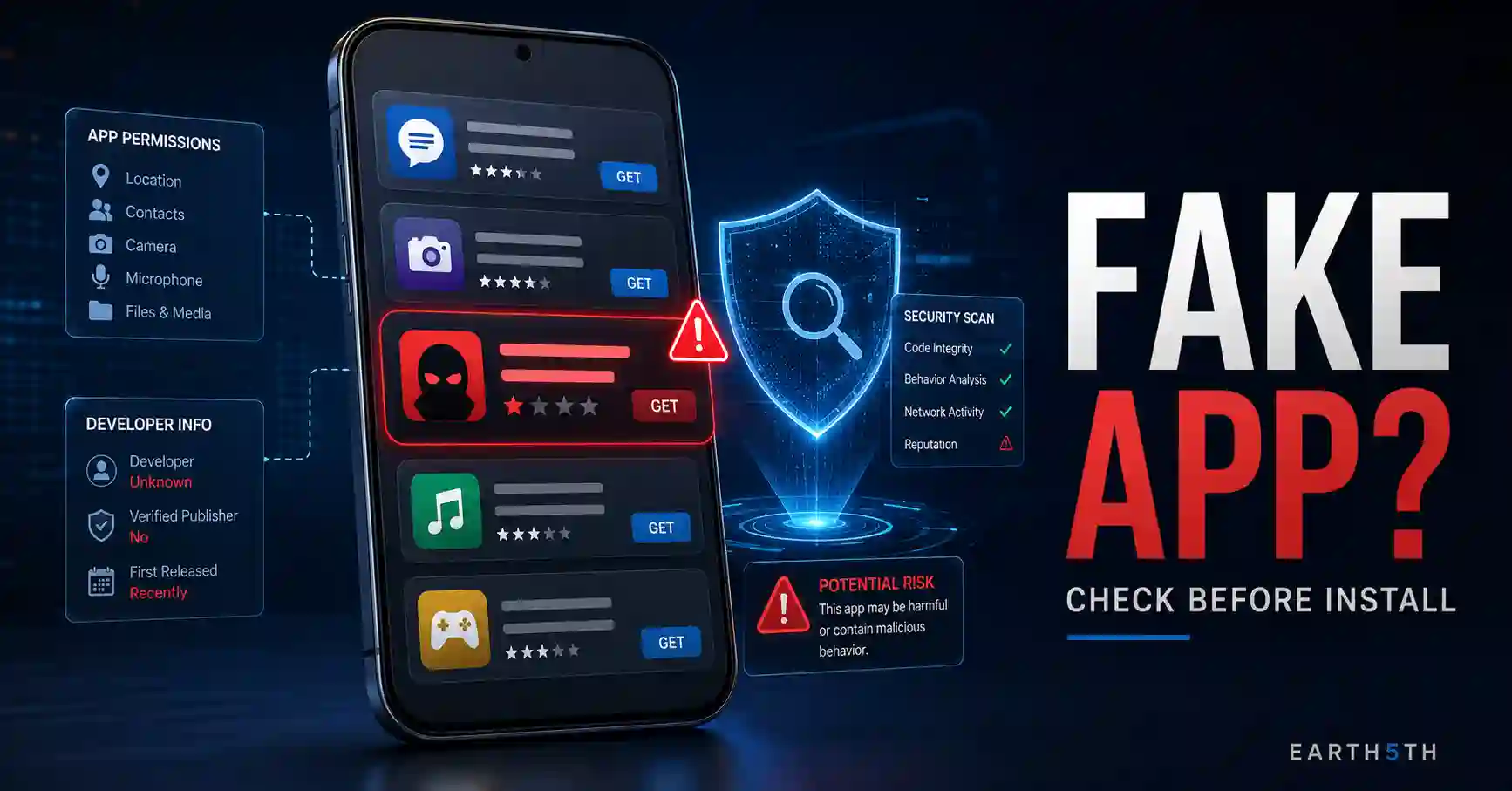
Fake apps തിരിച്ചറിയാൻ app icon അല്ലെങ്കിൽ star rating മാത്രം നോക്കുന്നത് മതിയാകില്ല. App ലഭിച്ച source, developer details, permissions, privacy information, reviews, official website, Google Play Protect പോലുള്ള security controls എന്നിവ ഒരുമിച്ച് പരിശോധിക്കുകയാണ് നല്ല രീതി.
2026 മാർച്ചിൽ CERT-In ഇന്ത്യയിലെ Android users-നെ ലക്ഷ്യമിട്ട വ്യാജ RTO/e-Challan APK campaign സംബന്ധിച്ച് മുന്നറിയിപ്പ് നൽകിയിരുന്നു. WhatsApp, SMS, Telegram, random websites എന്നിവ വഴി ലഭിക്കുന്ന APK files install ചെയ്യരുതെന്നും official app stores ഉപയോഗിക്കണമെന്നും CERT-In നിർദേശിച്ചു.
Fake App എന്താണ്?
ഒരു genuine application, company അല്ലെങ്കിൽ service പോലെ തോന്നിപ്പിച്ച് user-നെ install ചെയ്യാൻ പ്രേരിപ്പിക്കുന്ന വ്യാജ application-നെയാണ് സാധാരണയായി fake app എന്ന് വിളിക്കുന്നത്.
Fake app:
- Genuine app-ന്റെ പേര് അല്ലെങ്കിൽ icon അനുകരിക്കാം
- Login information ചോദിക്കാം
- അനാവശ്യ permissions ആവശ്യപ്പെടാം
- Advertising മാത്രം കാണിക്കാം
- Sensitive information ശേഖരിക്കാം
- Device-ൽ malware install ചെയ്യാം
CERT-In fake mobile applications credentials, location, sensitive information എന്നിവ ലക്ഷ്യമിടാനും malware വിതരണം ചെയ്യാനും ഉപയോഗിക്കപ്പെടാമെന്ന് മുന്നറിയിപ്പ് നൽകിയിട്ടുണ്ട്.
എന്നാൽ ഒരു spelling mistake കണ്ടതുകൊണ്ടോ review കുറവായതുകൊണ്ടോ മാത്രം app fake ആണെന്ന് ഉറപ്പിക്കാൻ കഴിയില്ല. പല സൂചനകളും ഒരുമിച്ച് പരിശോധിക്കുക.
Fake Apps തിരിച്ചറിയാൻ Install ചെയ്യുന്നതിന് മുമ്പുള്ള 10 Checks
1. App എവിടെ നിന്നാണ് ലഭിച്ചതെന്ന് ആദ്യം പരിശോധിക്കുക
App download ചെയ്യാൻ ലഭിച്ച source ആണ് ആദ്യ check.
WhatsApp message, Telegram group, SMS, email അല്ലെങ്കിൽ random website വഴി APK ലഭിച്ചാൽ ഉടൻ install ചെയ്യരുത്.
2026 CERT-In e-Challan malware advisory പ്രത്യേകിച്ച് WhatsApp, SMS, Telegram, random websites വഴി ലഭിക്കുന്ന APK files install ചെയ്യാതിരിക്കാനും download source official app store-കളിലേക്ക് പരിമിതപ്പെടുത്താനും നിർദേശിക്കുന്നു.
ഒരു bank, government department അല്ലെങ്കിൽ popular company app download ചെയ്യണമെന്ന് message അയച്ചാൽ:
- Message-ലുള്ള link തുറക്കാതിരിക്കുക.
- Organisation-ന്റെ official website സ്വയം തുറക്കുക.
- അവിടെയുള്ള official mobile-app link കണ്ടെത്തുക.
- അതുവഴി Play Store അല്ലെങ്കിൽ App Store listing തുറക്കുക.
Official-looking message ലഭിച്ചതുകൊണ്ട് മാത്രം source genuine ആകണമെന്നില്ല.
2. Developer Name പരിശോധിക്കുക
App name മാത്രം നോക്കി തീരുമാനിക്കരുത്.
Play Store അല്ലെങ്കിൽ App Store listing-ൽ കാണുന്ന developer/publisher name പരിശോധിക്കുക.
ഉദാഹരണത്തിന് ഒരു banking app ആണെങ്കിൽ അതിന്റെ official bank website-ലുള്ള app information-നോട് developer details match ചെയ്യുന്നുണ്ടോ പരിശോധിക്കുക.
CERT-In app install ചെയ്യുന്നതിന് മുമ്പ് developer സംബന്ധിച്ച് research ചെയ്യാൻ ഉപയോക്താക്കളോട് നിർദേശിക്കുന്നു.
Developer name സംശയകരമാണെങ്കിൽ:
- Official website പരിശോധിക്കുക
- Developer website link പരിശോധിക്കുക
- Support/contact details പരിശോധിക്കുക
- Official organisation അതേ app-ലേക്ക് link ചെയ്യുന്നുണ്ടോ നോക്കുക
Official app സ്ഥിരീകരിക്കാൻ കഴിയുന്നില്ലെങ്കിൽ install ഒഴിവാക്കുന്നതാണ് സുരക്ഷിതം.
3. App Name, Icon, Description ശ്രദ്ധിച്ച് പരിശോധിക്കുക
Fake applications genuine branding അനുകരിക്കാൻ ശ്രമിക്കാം.
ശ്രദ്ധിക്കേണ്ട warning signs:
- Brand name-ൽ ചെറിയ spelling മാറ്റം
- Poor-quality logo
- App description-ൽ നിരവധി grammar errors
- Screenshots-നും app purpose-നും തമ്മിൽ ബന്ധമില്ല
- Unusual company/developer name
- Description മുഴുവനും exaggerated promotional claims
CERT-In spelling errors, poor logos, badly formatted interfaces തുടങ്ങിയ visual issues fake app-ന്റെ സൂചനകളാകാമെന്ന് പറയുന്നു.
എന്നാൽ genuine small developers-ന്റെ app-ലും design imperfections ഉണ്ടാകാം. അതിനാൽ visual appearance മാത്രം final proof അല്ല.
4. App Permissions അതിന്റെ Function-നോട് യോജിക്കുന്നുണ്ടോ?
App എന്തിനാണ് ഉപയോഗിക്കുന്നത് എന്നതുമായി permissions ബന്ധമുള്ളതാണോ പരിശോധിക്കുക.
ഉദാഹരണത്തിന് simple flashlight app:
- SMS
- Contacts
- Call logs
- Microphone
എല്ലാം ആവശ്യപ്പെടുകയാണെങ്കിൽ അതിന് വ്യക്തമായ കാരണം ഉണ്ടോയെന്ന് പരിശോധിക്കണം.
Google Play-ന്റെ permissions information ഒരു app ഏത് device features അല്ലെങ്കിൽ data access ചെയ്യാനിടയുണ്ടെന്ന് മനസ്സിലാക്കാൻ സഹായിക്കുന്നു. Google വ്യക്തമാക്കുന്നതനുസരിച്ച് permissions list-ും Data safety information-ഉം ഒരേ കാര്യമല്ല.
Sensitive permissions കാണുമ്പോൾ ചോദിക്കേണ്ടത്:
“ഈ app-ന്റെ പ്രധാന function ചെയ്യാൻ ഈ permission ശരിക്കും ആവശ്യമാണോ?”
കാരണം വ്യക്തമല്ലെങ്കിൽ permission അനുവദിക്കാതിരിക്കുകയോ മറ്റൊരു app തിരഞ്ഞെടുക്കുകയോ ചെയ്യാം.
5. Google Play-ൽ Data Safety Section വായിക്കുക
Android app install ചെയ്യുന്നതിന് മുമ്പ് Google Play listing-ലുള്ള Data safety section പരിശോധിക്കുക.
Google പറയുന്നതനുസരിച്ച് developer app എന്തുതരം data collect/share ചെയ്യുന്നു, അതിനെ എങ്ങനെ handle ചെയ്യുന്നു തുടങ്ങിയ വിവരങ്ങൾ ഈ section-ൽ declare ചെയ്യണം.
App page-ൽ താഴേക്ക് scroll ചെയ്ത് Data safety പരിശോധിക്കുമ്പോൾ:
- Location collect ചെയ്യുന്നുണ്ടോ?
- Personal information collect ചെയ്യുന്നുണ്ടോ?
- Financial information handle ചെയ്യുന്നുണ്ടോ?
- Data third parties-ുമായി share ചെയ്യുന്നതായി പറയുന്നുണ്ടോ?
- Data deletion options സംബന്ധിച്ച information ഉണ്ടോ?
എന്നിവ ശ്രദ്ധിക്കാം.
ഒരു പ്രധാന limitation
Data safety information developer declarations അടിസ്ഥാനമാക്കിയുള്ളതാണ്. Google തന്നെയാണ് developer അതിന്റെ accuracy maintain ചെയ്യേണ്ട ഉത്തരവാദിത്തം വഹിക്കുന്നതായി വ്യക്തമാക്കുന്നത്. അതിനാൽ Data safety section ഒരു useful transparency tool ആണ്; app completely safe ആണെന്ന guarantee അല്ല.
6. Ratings മാത്രം അല്ല, Reviews കൂടി വായിക്കുക
4.8 അല്ലെങ്കിൽ 4.9 rating ഉള്ളതുകൊണ്ട് മാത്രം app genuine ആണെന്ന് തീരുമാനിക്കരുത്.
Reviews തുറന്ന് പ്രത്യേകിച്ച് recent reviews പരിശോധിക്കുക.
ശ്രദ്ധിക്കാവുന്ന കാര്യങ്ങൾ:
- Recent users login problem report ചെയ്യുന്നുണ്ടോ?
- Unexpected ads സംബന്ധിച്ച complaints ഉണ്ടോ?
- Payment-related issues ആവർത്തിക്കുന്നുണ്ടോ?
- Permissions സംബന്ധിച്ച് users പരാതിപ്പെടുന്നുണ്ടോ?
- Reviews എല്ലാം വളരെ similar wording ആണോ?
Apple App Store-ലും ratings/reviews download decision എടുക്കാൻ സഹായിക്കുന്ന information ആയി നൽകുന്നു; fraudulent അല്ലെങ്കിൽ inappropriate reviews കണ്ടെത്താനും remove ചെയ്യാനും Apple നടപടികൾ സ്വീകരിക്കുന്നതായി പറയുന്നു.
Reviews useful signal മാത്രമാണ്. Genuine reviews ഉണ്ടെന്നത് മാത്രം security guarantee അല്ല.
7. Downloads അല്ലെങ്കിൽ Popularity ഒറ്റയ്ക്ക് വിശ്വസിക്കരുത്
വളരെ കൂടുതൽ downloads ഉള്ള app generally കൂടുതൽ established ആയിരിക്കാം. എന്നാൽ download count മാത്രം authenticity തെളിയിക്കില്ല.
ഒരു fake app genuine app-ന്റെ brand name ഉപയോഗിച്ച് users-നെ തെറ്റിദ്ധരിപ്പിക്കാൻ കഴിയും. അതിനാൽ downloads പരിശോധിക്കുമ്പോഴും developer, official website, permissions, privacy information എന്നിവ കൂടി പരിശോധിക്കുക.
CERT-In ratings, reviews, download information എന്നിവ app research-ന്റെ ഭാഗമാക്കാൻ നിർദേശിക്കുന്നുണ്ടെങ്കിലും അവ ഒറ്റയ്ക്ക് final verification method അല്ല.
8. Android-ൽ Google Play Protect Enabled ആണെന്ന് ഉറപ്പാക്കുക
Google Play Protect Android-ൽ potentially harmful applications കണ്ടെത്താൻ സഹായിക്കുന്ന built-in protection ആണ്.
Google പറയുന്നതനുസരിച്ച് Play Protect:
- Play Store apps download ചെയ്യുന്നതിന് മുമ്പ് safety check നടത്തുന്നു
- Other sources-ൽ നിന്നുള്ള apps പരിശോധിക്കാം
- Potentially harmful app warning നൽകാം
- Harmful app disable അല്ലെങ്കിൽ remove ചെയ്യാം
- ചില unverified apps sensitive permissions ഉപയോഗിക്കുന്ന സാഹചര്യങ്ങളിൽ installation തടയാം
Play Protect പരിശോധിക്കാൻ
- Google Play Store തുറക്കുക.
- മുകളിൽ Profile icon tap ചെയ്യുക.
- Play Protect തിരഞ്ഞെടുക്കുക.
- Settings തുറക്കുക.
- Scan apps with Play Protect enabled ആണെന്ന് ഉറപ്പാക്കുക.
Google security reasons കൊണ്ട് Play Protect enabled ആയി നിലനിർത്താൻ ശുപാർശ ചെയ്യുന്നു.
Outside Play Store applications install ചെയ്യുന്നവർക്ക് Improve harmful app detection option സംബന്ധിച്ച Google guidance-ും പരിശോധിക്കാം.
9. iPhone-ൽ App Privacy Information പരിശോധിക്കുക
iPhone/iPad users App Store product page-ലുള്ള App Privacy information പരിശോധിക്കാം.
Apple പറയുന്നതനുസരിച്ച് App Store product pages privacy nutrition labels നൽകുന്നു. Location, browsing history, contacts തുടങ്ങിയ data ഒരു app എങ്ങനെ collect/use ചെയ്യാമെന്നതിനെക്കുറിച്ചുള്ള summary അവ നൽകുന്നു.
App install ചെയ്യുന്നതിന് മുമ്പ്:
- App Store listing തുറക്കുക.
- Developer name പരിശോധിക്കുക.
- App Privacy section വായിക്കുക.
- Ratings & Reviews പരിശോധിക്കുക.
- Official company website-ൽ app verify ചെയ്യുക.
Apple App Store-ലുള്ള apps, updates എന്നിവ App Review process-ിലൂടെ പരിശോധിക്കുന്നതായി Apple പറയുന്നു.
എങ്കിലും App Store-ൽ ലഭ്യമാണെന്നത് മാത്രം ഉപയോഗിച്ച് personal privacy requirements അവഗണിക്കരുത്.
10. Banking, UPI, Government Apps Extra Carefully Verify ചെയ്യുക
Financial അല്ലെങ്കിൽ government-related app install ചെയ്യുമ്പോൾ കൂടുതൽ verification നടത്തണം.
CERT-In-ന്റെ March 2026 advisory-ൽ attackers official RTO/e-Challan notification പോലെ തോന്നിക്കുന്ന messages ഉപയോഗിച്ച് “RTO Challan.apk”, “MParivahan.apk” പോലുള്ള പേരുകളുള്ള malicious files വിതരണം ചെയ്തതായി പറയുന്നു. Malware SMS, phone-related permissions തുടങ്ങിയ sensitive access ആവശ്യപ്പെട്ടിരുന്നു.
അതുകൊണ്ട് government-style icon അല്ലെങ്കിൽ familiar app name മാത്രം നോക്കരുത്.
Safe verification method
- Institution-ന്റെ official website manually തുറക്കുക.
- അതിലെ app/download information കണ്ടെത്തുക.
- Official store link follow ചെയ്യുക.
- Developer name match ചെയ്യുക.
- Permissions പരിശോധിക്കുക.
- Security warning bypass ചെയ്യരുത്.
Banking app install ചെയ്യാൻ caller അല്ലെങ്കിൽ message ആവശ്യപ്പെടുമ്പോൾ അതിൽ ലഭിച്ച link ആശ്രയിക്കാതെ bank-ന്റെ official website/app store listing independently കണ്ടെത്തുക.
APK File കണ്ടാൽ അത് Fake App ആണോ?
അല്ല.
APK Android application package format ആണ്. Genuine Android applications-നും APK format ഉപയോഗിക്കാം.
Risk file format മാത്രമല്ല; source, developer, app behaviour, permissions, authenticity എന്നിവയാണ് പ്രധാനപ്പെട്ടത്.
എന്നിരുന്നാലും ordinary users-ക്ക് WhatsApp, Telegram, SMS, random download pages എന്നിവ വഴി ലഭിക്കുന്ന APK files install ചെയ്യാതിരിക്കുക എന്നതാണ് safer default. 2026 CERT-In advisory-യും unknown-source APKs ഒഴിവാക്കാൻ ശുപാർശ ചെയ്യുന്നു.
Play Store-ൽ ഉള്ള App Fake ആകാൻ സാധ്യതയുണ്ടോ?
Google Play harmful apps കണ്ടെത്താനും remove ചെയ്യാനും protections ഉപയോഗിക്കുന്നു. Play Protect installation സമയത്തും പിന്നീട് periodically-യും apps scan ചെയ്യുന്നു.
എങ്കിലും user-side verification ഉപേക്ഷിക്കേണ്ടതില്ല.
Install ചെയ്യുന്നതിന് മുമ്പ്:
- Developer
- App purpose
- Permissions
- Data safety
- Reviews
- Official website
എന്നിവ പരിശോധിക്കുന്നത് ഇപ്പോഴും useful ആണ്.
“Play Store-ൽ ഉണ്ട്, അതിനാൽ എന്തും Allow ചെയ്യാം” എന്ന സമീപനം ഒഴിവാക്കുക.
App Already Install ചെയ്ത ശേഷം എന്ത് പരിശോധിക്കാം?
Android
App unusual permissions ഉപയോഗിക്കുന്നതായി സംശയമുണ്ടെങ്കിൽ Settings-ൽ permissions review ചെയ്യാം.
Google Play Protect harmful app warning നൽകിയാൽ warning ignore ചെയ്യാതെ app source വീണ്ടും പരിശോധിക്കുക. Google potentially harmful apps disable/remove ചെയ്യാനും privacy alerts നൽകാനും Play Protect ഉപയോഗിക്കുന്നതായി പറയുന്നു.
iPhone
iOS 15.2 അല്ലെങ്കിൽ അതിന് ശേഷമുള്ള supported versions-ൽ App Privacy Report ഉപയോഗിച്ച് apps Location, Camera, Microphone, Contacts തുടങ്ങിയ privacy-sensitive data എപ്പോൾ access ചെയ്തുവെന്ന് പരിശോധിക്കാം.
Path:
Settings → Privacy & Security → App Privacy Report
App Privacy Report enable ചെയ്തശേഷമാണ് activity collection ആരംഭിക്കുക.
Unexpected access കാണുന്നുവെങ്കിൽ app permission review ചെയ്യാം.
Fake App Already Install ചെയ്തതായി സംശയിച്ചാൽ
പ്രത്യേകിച്ച് unknown APK install ചെയ്തശേഷം suspicious behaviour കാണുന്നുവെങ്കിൽ:
- Sensitive financial activity താൽക്കാലികമായി ഒഴിവാക്കുക.
- Suspicious app uninstall ചെയ്യുക.
- Google Play Protect scan നടത്തുക.
- Device/software security updates install ചെയ്യുക.
- App-ന് നൽകിയ sensitive permissions review ചെയ്യുക.
- Password അല്ലെങ്കിൽ financial credential നൽകിയിട്ടുണ്ടെങ്കിൽ ബന്ധപ്പെട്ട official service വഴി credentials secure ചെയ്യുക.
- Unauthorized banking transaction ഉണ്ടെങ്കിൽ bank-നെ ഉടൻ ബന്ധപ്പെടുക.
CERT-In e-Challan malware install ചെയ്ത users-നോട് internet disconnect ചെയ്യുക, suspicious applications uninstall ചെയ്യുക, security scan നടത്തുക, passwords/UPI PIN change ചെയ്യുക, bank statements പരിശോധിക്കുക തുടങ്ങിയ നടപടികൾ നിർദേശിച്ചിട്ടുണ്ട്.
Fake Apps പരിശോധിക്കുമ്പോൾ സാധാരണ ചെയ്യുന്ന Mistakes
1. Logo കണ്ടു മാത്രം വിശ്വസിക്കുന്നത്
Logo copy ചെയ്യാൻ കഴിയും. Developer independently verify ചെയ്യുക.
2. Star rating മാത്രം നോക്കുന്നത്
Rating useful signal ആണ്; proof അല്ല.
3. WhatsApp വഴി കിട്ടിയ APK ഉടൻ install ചെയ്യുന്നത്
File അയച്ചത് പരിചയമുള്ള ആളാണെങ്കിലും source verify ചെയ്യുക.
4. എല്ലാ Permissions-നും Allow നൽകുന്നത്
Permission app function-ന് ആവശ്യമാണോ പരിശോധിക്കുക.
5. Security Warning bypass ചെയ്യുന്നത്
Play Protect അല്ലെങ്കിൽ operating-system warning കാരണം മനസ്സിലാക്കാതെ disable ചെയ്യരുത്.
6. Official-looking name genuine എന്ന് കരുതുന്നത്
CERT-In 2026 campaign government-service names അനുകരിച്ച malware ഉപയോഗിച്ചതാണ്.
App Genuine ആണോ Verify ചെയ്യാൻ കഴിയുന്നില്ലെങ്കിൽ?
Developer-നെ verify ചെയ്യാൻ കഴിയുന്നില്ല, official website app-നെക്കുറിച്ച് പറയുന്നില്ല, permissions unusual ആണ്, അല്ലെങ്കിൽ security warning ലഭിക്കുന്നു എന്നിങ്ങനെ ആയാൽ install ചെയ്യാതിരിക്കാം.
Service browser വഴി ലഭ്യമാണെങ്കിൽ official website ഉപയോഗിക്കുക.
Banking, government documents, payments, identity verification പോലുള്ള sensitive tasks-നായി unknown application പരീക്ഷിക്കുന്നത് ഒഴിവാക്കുക.
Frequently Asked Questions
Fake apps തിരിച്ചറിയാൻ ഏറ്റവും പ്രധാനപ്പെട്ട check ഏതാണ്?
ഒരു single check മതിയാകില്ല. Download source, developer, official website, permissions, privacy information, reviews, built-in security warnings എന്നിവ ഒരുമിച്ച് പരിശോധിക്കുക.
Google Play Protect എല്ലാ fake apps-ഉം കണ്ടെത്തുമോ?
Google Play Protect harmful applications കണ്ടെത്താനും warn, disable അല്ലെങ്കിൽ remove ചെയ്യാനും സഹായിക്കുന്നു. എന്നാൽ ഒരു security system-നും എല്ലാ threats കണ്ടെത്തുമെന്ന absolute guarantee ഇല്ല. User verification കൂടി തുടരുക.
APK file install ചെയ്യുന്നത് എപ്പോഴും അപകടമാണോ?
അല്ല. APK ഒരു Android package format ആണ്. എന്നാൽ unknown messaging apps, random websites, unsolicited links എന്നിവ വഴി ലഭിക്കുന്ന APK files ഉയർന്ന risk ഉണ്ടാക്കാം. CERT-In ഇത്തരം sources ഒഴിവാക്കാൻ ശുപാർശ ചെയ്യുന്നു.
iPhone-ൽ app safe ആണോ എന്ന് എങ്ങനെ പരിശോധിക്കാം?
App Store-ൽ developer, App Privacy information, ratings/reviews, official website എന്നിവ പരിശോധിക്കുക. Install ചെയ്തശേഷം App Privacy Report ഉപയോഗിച്ച് sensitive data access review ചെയ്യാനും കഴിയും.
Fake app install ചെയ്ത ശേഷം password നൽകിയാൽ എന്ത് ചെയ്യണം?
ആ app-ന് നൽകിയ account credentials official service വഴി ഉടൻ മാറ്റുക. Banking credentials ഉൾപ്പെട്ടാൽ bank-നെ ബന്ധപ്പെടുകയും transactions പരിശോധിക്കുകയും ചെയ്യുക. Suspicious app remove ചെയ്ത് device security scan/update നടത്തുക.
Official Sources
Indian Computer Emergency Response Team (CERT-In) — Security Issues of Fake Mobile Applications
Open CERT-In Fake Mobile Applications Advisory
CERT-In — Sophisticated RTO/eChallan Themed Android Malware Campaign, March 17, 2026
Open CERT-In 2026 e-Challan Malware Advisory
Google Android Help — Use Google Play Protect
Open Google Play Protect Guide
Google Play Help — Understand App Privacy and Data Safety
Open Google Play Data Safety Guide
Apple Support — Maintaining a Safe App Store Experience
Open Apple App Store Safety Guide
Apple Support — App Privacy Report
Open Apple App Privacy Report Guide
Disclaimer
ഈ guide പൊതുവായ digital-safety information മാത്രമാണ്. ഒരു app genuine അല്ലെങ്കിൽ completely safe ആണെന്ന് ഒരു individual check ഉപയോഗിച്ച് ഉറപ്പാക്കാൻ കഴിയില്ല. Banking, payment, government അല്ലെങ്കിൽ identity-related apps ഉപയോഗിക്കുമ്പോൾ ബന്ധപ്പെട്ട organisation-ന്റെ official website/documentation വഴി വിവരങ്ങൾ independently verify ചെയ്യുക.