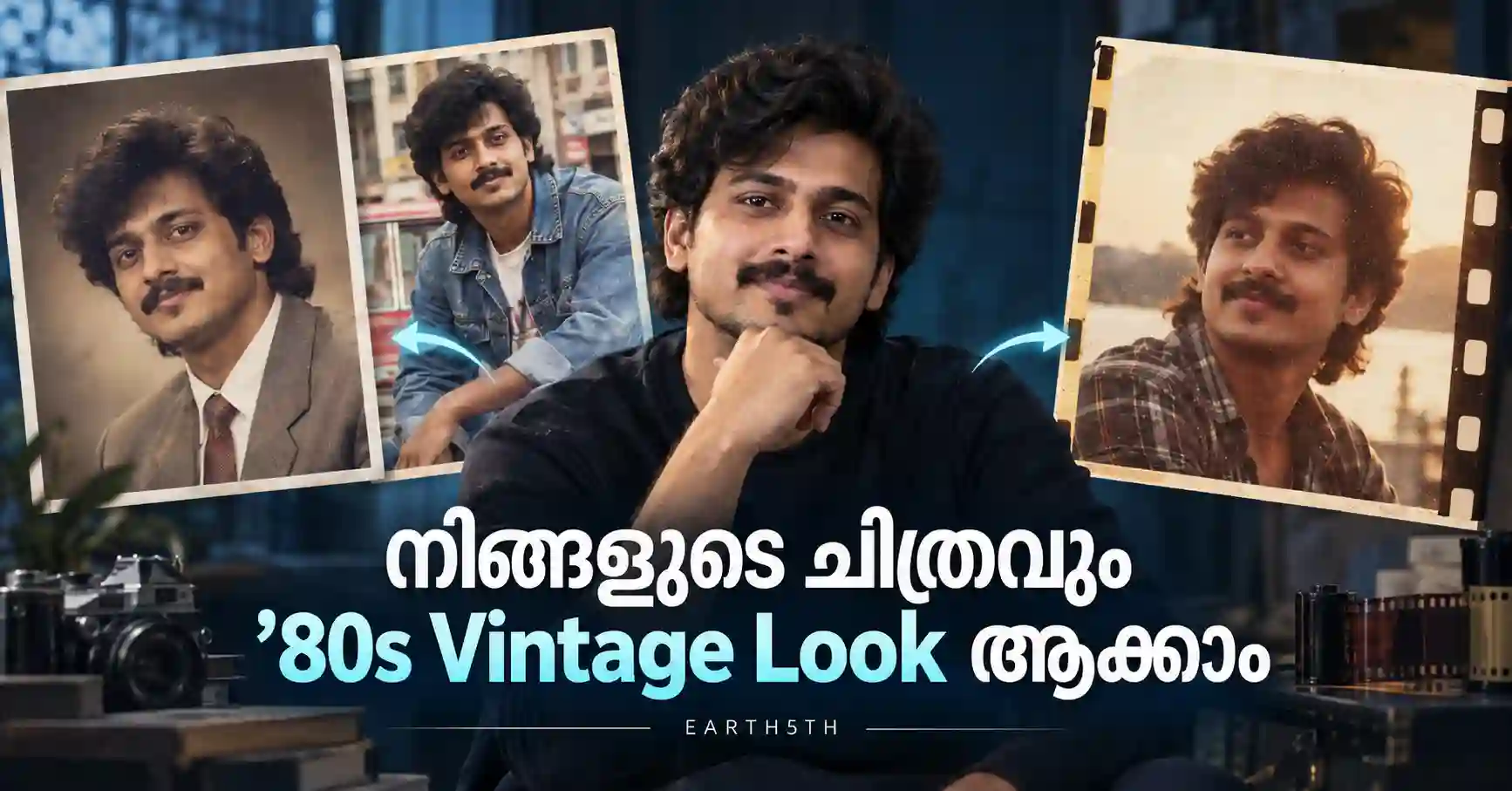
പഴയ 1980കളിലെ സിനിമകളിലും ഫാമിലി ആൽബങ്ങളിലും കാണുന്ന warm colors, grainy film texture, retro hairstyle, denim fashion, classic studio lighting എന്നിവയുള്ള ഒരു vintage photo look നിങ്ങളുടെ സ്വന്തം ചിത്രത്തിലും പരീക്ഷിക്കാം. അതിനായി professional photo-editing software നിർബന്ധമല്ല. ChatGPT Images പോലുള്ള AI image-editing tools-ൽ നിങ്ങളുടെ ചിത്രം upload ചെയ്ത്, എന്താണ് മാറ്റേണ്ടതെന്നും എന്താണ് മാറ്റരുതെന്നും വ്യക്തമായി പറയുന്ന prompt നൽകിയാൽ വ്യത്യസ്ത retro styles പരീക്ഷിക്കാൻ കഴിയും.
ഈ ഗൈഡിൽ ChatGPT 80s Vintage Photo Prompt ഉപയോഗിച്ച് നിങ്ങളുടെ ചിത്രം 1980s look-ലേക്ക് മാറ്റുന്ന വിധം, നേരിട്ട് copy-paste ചെയ്യാവുന്ന മൂന്ന് prompts, കൂടുതൽ natural result ലഭിക്കാൻ prompt എങ്ങനെ customize ചെയ്യാം, സാധാരണ സംഭവിക്കുന്ന തെറ്റുകൾ, privacy കാര്യങ്ങൾ എന്നിവ വിശദമായി നോക്കാം.
Last verified: September 2026
OpenAIയുടെ നിലവിലെ ChatGPT Images സൗകര്യം existing images upload ചെയ്ത് അവയിൽ ആവശ്യമായ മാറ്റങ്ങൾ text instructions വഴി നിർദ്ദേശിക്കാൻ അനുവദിക്കുന്നു. Image editor ഉപയോഗിച്ച് ചിത്രത്തിന്റെ ഒരു പ്രത്യേക ഭാഗം select ചെയ്തും edit ആവശ്യപ്പെടാം.
പ്രധാനമായി അറിയേണ്ടത്
ഒരു നല്ല 80s vintage transformation ലഭിക്കാൻ prompt-ൽ മൂന്ന് കാര്യങ്ങൾ പ്രത്യേകം പറയുന്നത് സഹായകരമാണ്:
- മുഖത്തിന്റെ പ്രധാന സവിശേഷതകൾ കഴിയുന്നത്ര നിലനിർത്തുക.
- വസ്ത്രം, hairstyle, lighting, background എന്നിവ മാത്രം 1980s style-ലേക്ക് മാറ്റുക.
- film grain, warm tones, 35mm photography തുടങ്ങിയ vintage photography details ചേർക്കുക.
എന്നാൽ AI-generated edit ആയതിനാൽ മുഖം, കണ്ണുകൾ, hairstyle അല്ലെങ്കിൽ ചെറിയ facial details 100% identical ആയിരിക്കുമെന്ന് ഉറപ്പില്ല. Result ഇഷ്ടപ്പെട്ടില്ലെങ്കിൽ പുതിയ ചിത്രം upload ചെയ്യുന്നതിനു പകരം അതേ conversation-ൽ കൂടുതൽ specific correction prompt നൽകുന്നതാണ് പലപ്പോഴും എളുപ്പം.
ChatGPT ഉപയോഗിച്ച് 80s Vintage Photo ഉണ്ടാക്കുന്നത് എങ്ങനെ?
ChatGPT Images ഉപയോഗിക്കുമ്പോൾ existing photo upload ചെയ്ത് അതിൽ എന്ത് മാറ്റം വേണമെന്ന് നേരിട്ട് വിവരിക്കാം. Web, iOS, Android എന്നിവയിൽ image capabilities ലഭ്യമാണ്; account, platform, usage limits എന്നിവയെ ആശ്രയിച്ച് interface-ൽ ചെറിയ വ്യത്യാസങ്ങൾ ഉണ്ടായേക്കാം.
Step 1: നല്ലൊരു ചിത്രം തിരഞ്ഞെടുക്കുക
ആദ്യം നിങ്ങളുടെ മുഖം വ്യക്തമായി കാണുന്ന ഒരു photo തിരഞ്ഞെടുക്കുക.
മികച്ച result ലഭിക്കാൻ സാധാരണയായി സഹായിക്കുന്ന കാര്യങ്ങൾ:
- മുഖത്ത് മതിയായ lighting ഉണ്ടായിരിക്കണം.
- Photo വളരെ blurry ആയിരിക്കരുത്.
- മുഖത്തിന്റെ വലിയൊരു ഭാഗം sunglasses, mask, കൈ എന്നിവ കൊണ്ട് മറഞ്ഞിരിക്കരുത്.
- Front-facing അല്ലെങ്കിൽ slight-angle portrait ഉപയോഗിക്കുന്നത് സൗകര്യപ്രദമാണ്.
- Full-body retro fashion വേണമെങ്കിൽ body വ്യക്തമായി കാണുന്ന ചിത്രം ഉപയോഗിക്കുക.
Original photoയുടെ quality കുറവാണെങ്കിൽ AIയ്ക്ക് facial details ശരിയായി പിടികൂടാൻ ബുദ്ധിമുട്ട് ഉണ്ടാകാം.
Step 2: ചിത്രം ChatGPT-ലേക്ക് upload ചെയ്യുക
ChatGPT conversation-ൽ attachment option ഉപയോഗിച്ച് photo ചേർക്കാം. OpenAIയുടെ help documentation പ്രകാരം Add photos & files വഴി ചിത്രം ചേർക്കാനോ supported interfaces-ൽ drag-and-drop / paste ചെയ്യാനോ സാധിക്കും.
Interface updates വന്നാൽ menu പേരുകൾ മാറാൻ സാധ്യതയുള്ളതിനാൽ നിങ്ങളുടെ screen-ൽ കാണുന്ന ഏറ്റവും അടുത്ത image/file upload option ഉപയോഗിക്കുക.
Step 3: താഴെയുള്ള prompt-ുകളിൽ ഒന്ന് ഉപയോഗിക്കുക
Photo upload ചെയ്ത ശേഷം താഴെ നൽകിയിരിക്കുന്ന prompt നേരിട്ട് paste ചെയ്യാം.
Prompt 1: ഓൾ-ഇൻ-വൺ 1980s Retro Look
ഒരു balanced transformation വേണ്ടവർക്ക് ആദ്യം പരീക്ഷിക്കാൻ പറ്റുന്ന prompt:
“What would I have looked like in the 80s? Transform this uploaded photo into an authentic 1980s portrait while preserving my recognizable facial features, face shape and overall identity as closely as possible. Add realistic 1980s fashion, hairstyle and era-appropriate styling. Use warm nostalgic colors, subtle 35mm film grain, natural skin texture, realistic lighting and an authentic vintage photography aesthetic. Keep the result photorealistic and avoid making the face look artificial or overly retouched.”
ഈ prompt-ൽ outfit, hair, photography style എന്നിവ ഒരുമിച്ച് മാറ്റാൻ നിർദ്ദേശിക്കുന്നതിനാൽ പൊതുവായ retro portrait-ിന് ഇത് അനുയോജ്യമാണ്.
നിങ്ങൾ male photo edit ചെയ്യുകയാണെങ്കിൽ hairstyle, moustache, denim jacket, leather jacket തുടങ്ങിയ details ചേർക്കാം. Female portrait ആണെങ്കിൽ era-appropriate layered hairstyle, vintage blouse, jacket അല്ലെങ്കിൽ subtle period-inspired makeup പോലുള്ള കാര്യങ്ങൾ പ്രത്യേകം prompt-ൽ പറയാം.
Prompt 2: Classic 1980s Studio Portrait
പഴയ ഫാമിലി സ്റ്റുഡിയോയിൽ എടുത്ത portrait പോലുള്ള look ആണ് വേണ്ടതെങ്കിൽ:
“Convert my uploaded photo into a classic 1980s studio portrait. Preserve my recognizable facial features, facial proportions and natural skin appearance as closely as possible. Give me a realistic 1980s hairstyle and a tasteful vintage outfit appropriate to the era. Use soft studio lighting, a simple retro photography backdrop, gentle warm tones, subtle film grain and slightly faded print-photo characteristics. Make it look like a genuine professionally photographed portrait from the 1980s, not a modern photo with a filter.”
ഇവിടെ ശ്രദ്ധിക്കേണ്ട പ്രധാന phrase:
“not a modern photo with a filter.”
Retro effect എന്ന പേരിൽ ചില results വെറും color filter പോലെയാകാം. അതിനുപകരം hairstyle, clothes, lighting, backdrop എന്നിവയും period-correct ആക്കണമെന്ന intent ഈ instruction വ്യക്തമാക്കുന്നു.
Studio photo കൂടുതൽ vintage ആക്കാൻ ചേർക്കാവുന്ന lines
Prompt-ന്റെ അവസാനം ഇവയിൽ ആവശ്യമായത് ചേർക്കാം:
- “Use a soft beige and brown studio background.”
- “Give the photo the appearance of an aged family album print.”
- “Use subtle flash photography typical of old studio portraits.”
- “Keep skin texture natural and avoid plastic-looking skin.”
- “Do not add modern accessories.”
Prompt 3: Cinematic 1980s Street Style
Retro movie still അല്ലെങ്കിൽ old street photography പോലുള്ള result വേണ്ടവർക്ക്:
“Recreate this uploaded image as an authentic 1980s street-style photograph. Preserve my recognizable facial identity and natural facial structure as closely as possible. Dress me in realistic 1980s casual fashion with a denim jacket and tasteful oversized retro sunglasses. Use natural outdoor sunlight, authentic street photography composition, subtle 35mm film grain, slightly faded colors, realistic shadows and period-appropriate styling. Make the scene feel genuinely photographed in the 1980s rather than digitally filtered.”
ഇവിടെ denim jacket, retro sunglasses തുടങ്ങിയവ example മാത്രമാണ്. നിങ്ങൾക്ക് അവ മാറ്റി leather jacket, tucked-in shirt, vintage T-shirt, old-school sportswear തുടങ്ങിയ options നൽകാം.
കൂടുതൽ Natural Result ലഭിക്കാൻ Prompt എങ്ങനെ മാറ്റാം?
AI image editing-ൽ വലിയ prompt തന്നെ എല്ലായ്പ്പോഴും മികച്ചതാകണമെന്നില്ല. നിങ്ങൾക്ക് ഏറ്റവും പ്രധാനപ്പെട്ട കാര്യങ്ങൾ വ്യക്തമായി പറയുന്നതാണ് നല്ലത്.
Facial identity കൂടുതൽ preserve ചെയ്യാൻ
Prompt-ൽ ഇതുപോലെ ചേർക്കാം:
“Do not intentionally change my age, face shape, nose, eyes, jawline or skin tone. Preserve my recognizable appearance as closely as possible.”
ഇത്തരത്തിലുള്ള instruction transformation ഏത് ഭാഗത്താണ് focus ചെയ്യേണ്ടതെന്ന് AIക്ക് കൂടുതൽ വ്യക്തത നൽകും. എന്നിരുന്നാലും generated image ഒരു pixel-perfect copy അല്ലാത്തതിനാൽ ചെറിയ facial differences ഉണ്ടാകാം.
Hairstyle മാത്രം 80s ആക്കാൻ
“Keep my face, clothes and background unchanged. Only change my hairstyle into a realistic 1980s hairstyle appropriate for my face.”
OpenAIയുടെ image editor ചില സാഹചര്യങ്ങളിൽ specific area select ചെയ്ത് അതിൽ മാത്രം മാറ്റം ആവശ്യപ്പെടാനും അനുവദിക്കുന്നു. Selection കൃത്യമല്ലാതിരിക്കാം, edit selected boundary-ക്കു പുറത്തേക്കും വ്യാപിക്കാമെന്ന് OpenAI വ്യക്തമാക്കുന്നു.
Background കൂടി 80s style ആക്കാൻ
“Replace the modern background with a believable 1980s environment while keeping me as the main subject.”
നിങ്ങൾക്ക് scene കൂടുതൽ specific ആക്കാം:
- 1980s photo studio
- old city street
- vintage living room
- retro café
- classic car background
- old family photo setting
എന്നാൽ background-ൽ specific historical place വേണമെങ്കിൽ അത് യഥാർത്ഥത്തിൽ എങ്ങനെയായിരുന്നു എന്ന് തെറ്റായി അവതരിപ്പിക്കാതിരിക്കാൻ generic period-inspired setting ഉപയോഗിക്കുന്നത് സുരക്ഷിതമാണ്.
80s Look കൂടുതൽ Authentic ആക്കാൻ ഉപയോഗിക്കാവുന്ന Keywords
Prompt customize ചെയ്യുമ്പോൾ താഴെയുള്ള terms ആവശ്യത്തിനനുസരിച്ച് ചേർക്കാം:
- 35mm film photography
- subtle film grain
- warm nostalgic tones
- faded print colors
- analog photography
- vintage studio lighting
- natural skin texture
- period-appropriate fashion
- soft flash photography
- authentic 1980s styling
- retro street photography
- slightly faded photo print
- natural shadows
- old family album aesthetic
എല്ലാ keywords-ഉം ഒരേസമയം ഇടേണ്ടതില്ല. നിങ്ങളുടെ ആവശ്യത്തിന് ചേരുന്ന 4–6 details തിരഞ്ഞെടുക്കുന്നതാണ് prompt കൂടുതൽ focused ആക്കുന്നത്.
Result ഇഷ്ടപ്പെട്ടില്ലെങ്കിൽ എന്ത് ചെയ്യണം?
ആദ്യ generation perfect ആയില്ലെങ്കിൽ മുഴുവൻ prompt വീണ്ടും മാറ്റേണ്ടതില്ല.
ഉദാഹരണത്തിന് മുഖം കൂടുതലായി മാറിയാൽ:
“Keep the current 1980s styling, but make the facial features closer to the uploaded reference photo. Reduce changes to the eyes, nose, jawline and face shape.”
Outfit ഇഷ്ടമല്ലെങ്കിൽ:
“Keep the face, hairstyle, lighting and background unchanged. Replace only the outfit with a simple authentic 1980s denim jacket and plain shirt.”
Photo വളരെ artificial ആണെങ്കിൽ:
“Make the image more photorealistic. Reduce AI-looking skin smoothing, excessive sharpness and unrealistic facial details. Add natural skin texture and subtle analog film grain.”
ഇങ്ങനെ ഒരു സമയത്ത് ഒരു issue മാത്രം correct ചെയ്യുന്നത് result control ചെയ്യാൻ കൂടുതൽ സൗകര്യപ്രദമാണ്.
Mobile-ൽ ഉപയോഗിക്കുമ്പോൾ ശ്രദ്ധിക്കേണ്ടത്
ChatGPT mobile app-ൽ generated image തുറന്ന് edit instructions നൽകാനും, supported editor interface-ൽ selection tool ഉപയോഗിക്കാനും സാധിക്കുന്നതായി OpenAIയുടെ current help documentation പറയുന്നു. Interface version അനുസരിച്ച് Edit, Select, Resize തുടങ്ങിയ controls ലഭ്യമായേക്കാം.
Mobile photo തിരഞ്ഞെടുക്കുമ്പോൾ:
- WhatsApp compressed screenshot-നെക്കാൾ original gallery photo ഉപയോഗിക്കുക.
- വളരെ ചെറിയ cropped image ഒഴിവാക്കുക.
- മറ്റൊരാളുടെ face കൂടി frame-ൽ ഉണ്ടെങ്കിൽ ആരെയാണ് edit ചെയ്യേണ്ടതെന്ന് prompt-ൽ വ്യക്തമാക്കുക.
- Portrait image ആണെങ്കിൽ portrait aspect ratio ചോദിക്കാം.
- Instagram post അല്ലെങ്കിൽ Story ഉദ്ദേശിക്കുന്നുണ്ടെങ്കിൽ desired aspect ratio വ്യക്തമാക്കാം.
ChatGPT Images വിവിധ aspect ratios-ൽ generation/editing ചെയ്യാൻ support ചെയ്യുന്നതായി OpenAI വ്യക്തമാക്കുന്നു.
Privacy: സ്വന്തം ചിത്രം Upload ചെയ്യുന്നതിന് മുമ്പ് അറിയേണ്ടത്
Personal photo upload ചെയ്യുന്നത് ഒരു privacy decision കൂടിയാണ്. OpenAIയുടെ Privacy Policy പ്രകാരം users upload ചെയ്യുന്ന images ഉൾപ്പെടെയുള്ള content service input ആയി process ചെയ്യപ്പെടാം. Individual ChatGPT services ഉപയോഗിക്കുമ്പോൾ content model improvement-ിന് ഉപയോഗിക്കപ്പെടാവുന്നതാണ്; usersക്ക് Data Controls വഴി “Improve the model for everyone” off ചെയ്യാനുള്ള option ലഭ്യമാണെന്ന് OpenAI വ്യക്തമാക്കുന്നു.
Private അല്ലെങ്കിൽ sensitive photo upload ചെയ്യുന്നതിന് മുമ്പ് നിങ്ങളുടെ account privacy settings പരിശോധിക്കുന്നത് നല്ലതാണ്.
കൂടാതെ:
- മറ്റൊരാളുടെ ചിത്രം permission ഇല്ലാതെ edit ചെയ്യരുത്.
- കുട്ടികളുടെ അല്ലെങ്കിൽ മറ്റുള്ളവരുടെ private photos അനാവശ്യമായി upload ചെയ്യാതിരിക്കുക.
- ID card, passport, bank document തുടങ്ങിയ sensitive information photoയിൽ കാണുന്നുണ്ടെങ്കിൽ crop/remove ചെയ്യുക.
- Public ആയി share ചെയ്യുന്നതിന് മുമ്പ് background-ൽ personal details ഉണ്ടോ എന്ന് പരിശോധിക്കുക.
OpenAIയുടെ Service Terms പ്രകാരം മറ്റൊരു വ്യക്തിയുടെ likeness ഉപയോഗിക്കുമ്പോൾ ആവശ്യമായ consentയും rightsഉം ഉണ്ടായിരിക്കണം.
Common Mistakes to Avoid
1. “Make it vintage” എന്ന് മാത്രം പറയുന്നത്
Vintage എന്നത് 1950s, 1970s, 1980s, 1990s തുടങ്ങി പല visual styles ആയേക്കാം. അതിനാൽ 1980s, clothing type, photography style എന്നിവ വ്യക്തമാക്കുക.
2. ഒരേ prompt-ൽ വളരെ അധികം മാറ്റങ്ങൾ ചോദിക്കുന്നത്
Hair, face, age, body, location, vehicle, background, lighting, makeup എല്ലാം ഒരുമിച്ച് drastic ആയി മാറ്റാൻ പറഞ്ഞാൽ original identity കൂടുതൽ മാറാൻ സാധ്യതയുണ്ട്.
3. “Keep face 100% identical” എന്നതിനെ guarantee ആയി കരുതുന്നത്
Prompt-ൽ facial consistency ആവശ്യപ്പെടുന്നത് സഹായിക്കും. പക്ഷേ AI-generated edit ആയതിനാൽ exact identity preservation ഉറപ്പാക്കാനാവില്ല.
4. Low-quality image ഉപയോഗിക്കുന്നത്
Blur, heavy compression, extreme shadow എന്നിവ facial details നഷ്ടപ്പെടുത്താം.
5. Modern elements ഒഴിവാക്കാൻ പറയാതിരിക്കുന്നത്
Smartphones, modern cars, recent fashion എന്നിവ frame-ൽ ഉണ്ടെങ്കിൽ 1980s feel കുറയാം. ആവശ്യമെങ്കിൽ:
“Remove obvious modern objects and replace them with subtle period-appropriate alternatives.”
എന്ന് ചേർക്കാം.
സുരക്ഷിതമായി AI Photo Editing ഉപയോഗിക്കുക
Image transformation വിനോദത്തിനും creative experimentation-നും മികച്ചതാണ്. എന്നാൽ മറ്റുള്ളവരെ തെറ്റിദ്ധരിപ്പിക്കുന്ന തരത്തിൽ edited image യഥാർത്ഥ historical photograph ആണെന്ന് അവകാശപ്പെടുന്നത് ഒഴിവാക്കുക.
സ്വന്തമല്ലാത്ത ചിത്രങ്ങൾ ഉപയോഗിക്കുമ്പോൾ permission ഉറപ്പാക്കുക. Personal photos upload ചെയ്യുമ്പോൾ account privacy controls പരിശോധിക്കുക. Sensitive documents, OTP screenshots, passwords, financial information തുടങ്ങിയവ ഒരിക്കലും photoയുടെ background-ൽ ഉൾപ്പെടുത്തരുത്.
Frequently Asked Questions
ChatGPT-ൽ എന്റെ പഴയ photo 80s style ആക്കാൻ കഴിയുമോ?
അതെ. ChatGPT Images നിലവിൽ existing image upload ചെയ്ത് text instructions ഉപയോഗിച്ച് edit ചെയ്യാൻ support ചെയ്യുന്നു. Photo upload ചെയ്ത ശേഷം 1980s hairstyle, outfit, studio lighting, film grain എന്നിവ വ്യക്തമാക്കുന്ന prompt നൽകാം. Result source image qualityയും prompt specificityയും അനുസരിച്ച് മാറാം.
എന്റെ മുഖം അതേപോലെ തന്നെ നിലനിർത്താൻ കഴിയുമോ?
Prompt-ൽ facial features, face shape, skin tone തുടങ്ങിയവ preserve ചെയ്യാൻ പ്രത്യേകം പറയാം. എന്നാൽ AI-generated image ആയതിനാൽ pixel-perfect facial identity guarantee ചെയ്യാനാവില്ല. ചെറിയ differences വന്നാൽ follow-up prompt ഉപയോഗിച്ച് face changes കുറയ്ക്കാൻ ആവശ്യപ്പെടാം.
English prompt തന്നെയാണോ ഉപയോഗിക്കേണ്ടത്?
നിർബന്ധമില്ല. Malayalam ഉൾപ്പെടെ natural-language instructions ഉപയോഗിക്കാം. എന്നാൽ photography terms, fashion names, visual-style terms എന്നിവ English-ൽ നൽകിയാൽ prompt കൂടുതൽ specific ആക്കാൻ ചിലപ്പോൾ സൗകര്യമുണ്ടാകും. പ്രധാന കാര്യം ഭാഷയല്ല, instruction വ്യക്തമായിരിക്കുകയാണ്.
Male, female photos രണ്ടിലും ഈ prompts ഉപയോഗിക്കാമോ?
അതെ. Prompt generic ആയി ഉപയോഗിക്കാം. എന്നാൽ hairstyle, outfit, makeup തുടങ്ങിയ details വ്യക്തിയുടെ ഇഷ്ടത്തിന് അനുസരിച്ച് മാറ്റുന്നത് മികച്ച result നൽകും. AI സ്വമേധയാ stereotype അടിസ്ഥാനമാക്കിയുള്ള styling നൽകാതിരിക്കണമെങ്കിൽ desired look വ്യക്തമായി എഴുതുക.
Group photo 80s look ആക്കാമോ?
ശ്രമിക്കാം. പക്ഷേ frame-ൽ ആളുകൾ കൂടുതലാകുമ്പോൾ facial consistency നിലനിർത്തുന്നത് കൂടുതൽ challenging ആയേക്കാം. ഓരോ വ്യക്തിയുടെയും face preserve ചെയ്യണമെന്നും clothing/background മാത്രം മാറ്റണമെന്നും prompt-ൽ വ്യക്തമാക്കുക.
Result വളരെ AI-generated പോലെയാണെങ്കിൽ എന്തുചെയ്യണം?
“Natural skin texture”, “realistic lighting”, “subtle film grain”, “avoid excessive skin smoothing”, “make it look like a real 35mm photograph” തുടങ്ങിയ instructions ചേർക്കുക. Overly dramatic styling കുറയ്ക്കാനും ആവശ്യപ്പെടാം.
Upload ചെയ്യുന്ന photos private ആണോ?
ChatGPT ഉപയോഗിക്കുമ്പോൾ uploaded images user content ആയി process ചെയ്യപ്പെടുന്നു. Individual users അവരുടെ content model improvement-ിന് ഉപയോഗിക്കപ്പെടുന്നുണ്ടോ എന്നത് Data Controls വഴി നിയന്ത്രിക്കാം. Sensitive images upload ചെയ്യുന്നതിന് മുമ്പ് OpenAIയുടെ current privacy information പരിശോധിക്കുന്നത് നല്ലതാണ്.
അവസാനമായി
ഒരു സാധാരണ portrait photoയെ പഴയ family album portrait, classic 1980s studio photo, അല്ലെങ്കിൽ cinematic street photograph പോലുള്ള style-ലേക്ക് മാറ്റാൻ ChatGPT 80s Vintage Photo Prompt നല്ലൊരു creative starting point ആണ്. മികച്ച result ലഭിക്കാൻ “80s look” എന്ന് മാത്രം പറയാതെ facial preservation, hairstyle, fashion, lighting, film type, background എന്നിവ വ്യക്തമായി prompt-ൽ ഉൾപ്പെടുത്തുക.
ആദ്യ result perfect അല്ലെങ്കിൽ വീണ്ടും തുടങ്ങേണ്ടതില്ല. Face, clothing, lighting, background എന്നിവ ഓരോന്നായി follow-up instructions ഉപയോഗിച്ച് refine ചെയ്യാം. അതേസമയം AI edit എന്നതിനാൽ original photoയുമായി പൂർണമായ identity match ഉറപ്പാക്കാനാവില്ലെന്ന് മനസ്സിലാക്കി ഉപയോഗിക്കുന്നതാണ് നല്ലത്.
Official Sources & Further Reading
- OpenAI Help Center — Images in ChatGPT Images in ChatGPT
- OpenAI Help Center — ChatGPT Image Inputs FAQ ChatGPT Image Inputs FAQ
- OpenAI Help Center — How Your Data Is Used to Improve Model Performance How Your Data Is Used
- OpenAI — Privacy Policy OpenAI Privacy Policy
- OpenAI — Service Terms OpenAI Service Terms
Disclaimer: ഈ ലേഖനം പൊതുവായ വിവരങ്ങൾക്കും creative AI image-editing guidance-നും വേണ്ടിയാണ് പ്രസിദ്ധീകരിച്ചിരിക്കുന്നത്. ChatGPTയുടെ features, interface, availability, usage limits, privacy controls എന്നിവ കാലാനുസൃതമായി മാറാം. Personal images upload ചെയ്യുന്നതിന് മുമ്പ് നിലവിലെ settings, privacy terms എന്നിവ official OpenAI pages-ൽ പരിശോധിക്കുക. Earth5th ഒരു independent information website ആണ്; OpenAIയുമായോ ChatGPTയുമായോ ഔദ്യോഗിക ബന്ധമില്ല.