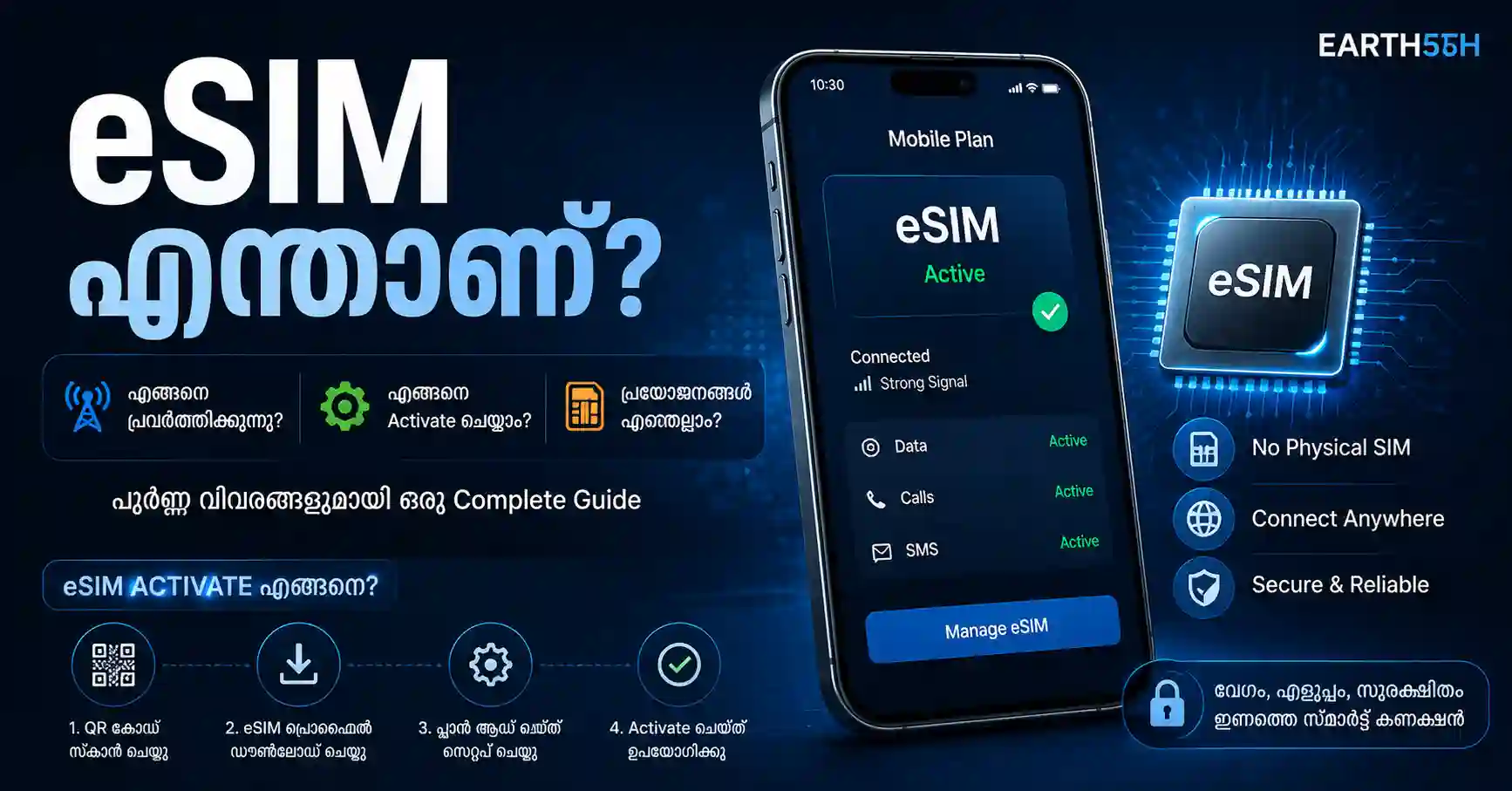
പുതിയ smartphone വാങ്ങുമ്പോൾ eSIM എന്ന option കൂടുതലായി കാണാൻ തുടങ്ങിയിട്ടുണ്ട്. സാധാരണ physical SIM card phone-ൽ insert ചെയ്യുന്നതിന് പകരം, mobile network plan digital ആയി device-ലേക്ക് activate ചെയ്യാൻ സഹായിക്കുന്ന സംവിധാനമാണ് eSIM.
eSIM ഉപയോഗിക്കാൻ phone മാത്രം support ചെയ്താൽ പോരാ. നിങ്ങളുടെ mobile network provider-ും eSIM support ചെയ്യണം. Activation method operator, phone model, country എന്നിവ അനുസരിച്ച് മാറാം. GSMA പ്രകാരം eSIM technology mobile subscription profile സുരക്ഷിതമായി device-ലുള്ള embedded secure element-ലേക്ക് download ചെയ്യാൻ അനുവദിക്കുന്നു.
eSIM എന്നതിന്റെ Full Form എന്താണ്?
eSIM എന്നത് സാധാരണയായി embedded SIM എന്നാണ് പറയുന്നത്.
Physical SIM പോലെ പുറത്തെടുത്ത് മറ്റൊരു phone-ലേക്ക് ഇടാവുന്ന card അല്ല ഇത്. eSIM support ചെയ്യുന്ന device-ൽ ആവശ്യമായ hardware ഇതിനകം തന്നെ built-in ആയിരിക്കും.
Mobile operator നൽകുന്ന SIM profile ഈ component-ലേക്ക് digitally download ചെയ്താണ് നിങ്ങളുടെ mobile number, calls, SMS, mobile data എന്നിവ network-ൽ activate ചെയ്യുന്നത്.
Apple eSIM-നെ physical SIM ഉപയോഗിക്കാതെ carrier mobile plan activate ചെയ്യാൻ അനുവദിക്കുന്ന industry-standard digital SIM എന്നാണ് വിവരിക്കുന്നത്.
eSIM എങ്ങനെ പ്രവർത്തിക്കുന്നു?
Physical SIM-നും eSIM-നും അടിസ്ഥാനപരമായ ലക്ഷ്യം ഒന്നുതന്നെയാണ്: നിങ്ങളുടെ subscription mobile network-ൽ authenticate ചെയ്യുക.
വ്യത്യാസം profile device-ലേക്ക് എത്തുന്ന രീതിയിലാണ്.
സാധാരണ eSIM activation ഇങ്ങനെ പ്രവർത്തിക്കുന്നു:
- നിങ്ങളുടെ phone eSIM support ചെയ്യുന്നു.
- Mobile operator നിങ്ങളുടെ connection-ന് ഒരു eSIM profile തയ്യാറാക്കുന്നു.
- Carrier app, QR code, direct carrier activation അല്ലെങ്കിൽ supported transfer method ഉപയോഗിച്ച് profile phone-ലേക്ക് download ചെയ്യുന്നു.
- Device profile securely store ചെയ്യുന്നു.
- Activation പൂർത്തിയായാൽ phone operator network-ലേക്ക് connect ചെയ്യുന്നു.
- Calls, SMS, mobile data എന്നിവ plan അനുസരിച്ച് ഉപയോഗിക്കാം.
GSMAയുടെ eSIM architecture physical removable SIM-ന്റെ പകരം SIM information embedded secure element-ലേക്ക് securely load ചെയ്യാനുള്ള സംവിധാനം നൽകുന്നു.
Physical SIM-നും eSIM-നും തമ്മിലുള്ള വ്യത്യാസം
Physical SIM
Physical SIM ചെറിയ removable card ആണ്.
Phone മാറ്റുമ്പോൾ card പുറത്തെടുത്ത് compatible device-ലേക്ക് മാറ്റാൻ സാധിക്കും. SIM tray ആവശ്യമാണ്.
eSIM
eSIM device-ലുള്ള embedded component ആണ്. അതുകൊണ്ട് SIM card physically insert ചെയ്യേണ്ടതില്ല.
Carrier profile digitally activate, manage അല്ലെങ്കിൽ supported സാഹചര്യങ്ങളിൽ transfer ചെയ്യാം.
Physical card നഷ്ടപ്പെടുക, damage ആകുക, SIM tray തുറക്കുക തുടങ്ങിയ പ്രശ്നങ്ങൾ eSIM-ൽ ഉണ്ടാകില്ല. എന്നാൽ phone മാറ്റുമ്പോൾ eSIM profile transfer ചെയ്യാനുള്ള process carrier/device support-നെ ആശ്രയിക്കും.
eSIM ഉപയോഗിക്കുന്നതിന്റെ പ്രധാന ഗുണങ്ങൾ
1. Physical SIM card ആവശ്യമില്ല
Operator shop-ൽ നിന്ന് SIM card വാങ്ങി tray-ൽ insert ചെയ്യേണ്ട സാഹചര്യം പല activation methods-ലും ഒഴിവാക്കാം.
2. Dual SIM ഉപയോഗിക്കാൻ സഹായിക്കും
പല compatible smartphones-ലും physical SIM + eSIM അല്ലെങ്കിൽ multiple eSIM profiles ഉപയോഗിക്കാനുള്ള support ലഭ്യമാണ്.
Google വ്യക്തമാക്കുന്നതനുസരിച്ച് supported Pixel devices-ൽ multiple eSIM profiles save ചെയ്യാനും eligible Pixel 7 അല്ലെങ്കിൽ അതിനുശേഷമുള്ള devices-ൽ carrier support ഉണ്ടെങ്കിൽ രണ്ട് eSIM profiles ഒരേസമയം ഉപയോഗിക്കാനും കഴിയും.
3. Personal, work numbers വേർതിരിക്കാം
ഒരു compatible phone-ൽ രണ്ട് mobile lines ഉപയോഗിക്കാൻ eSIM സൗകര്യപ്രദമാണ്.
എന്നാൽ ഒരേസമയം എത്ര SIM/eSIM lines active ആക്കാം എന്നത് phone model-നെ ആശ്രയിക്കും.
4. Travel സമയത്ത് ഉപകാരപ്പെടാം
Unlocked compatible phone ഉണ്ടെങ്കിൽ യാത്ര ചെയ്യുന്ന രാജ്യത്തിനായി supported operator അല്ലെങ്കിൽ travel eSIM plan activate ചെയ്യാൻ കഴിയാം.
Appleയുടെ current carrier documentation പ്രകാരം international travellers-നായി eSIM plans നൽകുന്ന providers പല രാജ്യങ്ങളിലും പ്രവർത്തിക്കുന്നു. Plan വാങ്ങുന്നതിന് മുമ്പ് coverage, validity, data allowance, calls/SMS support, roaming conditions എന്നിവ പരിശോധിക്കണം.
5. Phone നഷ്ടപ്പെട്ടാൽ SIM physically remove ചെയ്യാൻ കഴിയില്ല
Apple physical SIM-നേക്കാൾ eSIM-ന്റെ ഒരു security benefit ആയി, lost/stolen device-ൽ നിന്ന് eSIM physically remove ചെയ്യാൻ കഴിയില്ലെന്ന് വ്യക്തമാക്കുന്നു.
അതുകൊണ്ട് eSIM ഉപയോഗിക്കുന്നു എന്നൊരു കാര്യം മാത്രം phone പൂർണമായി secure ആക്കില്ല. Device screen lock, account security, Find My Device/Find My എന്നിവയും അത്രതന്നെ പ്രധാനമാണ്.
eSIM ഉപയോഗിക്കാൻ എന്താണ് വേണ്ടത്?
Activation തുടങ്ങുന്നതിന് മുമ്പ് താഴെ പറയുന്ന കാര്യങ്ങൾ പരിശോധിക്കുക.
- eSIM-compatible smartphone
- eSIM support ചെയ്യുന്ന mobile operator
- Active mobile plan അല്ലെങ്കിൽ eligible connection
- സാധാരണയായി Wi-Fi അല്ലെങ്കിൽ internet connection
- Carrier ആവശ്യപ്പെട്ടാൽ registered email/phone access
- QR code, carrier app അല്ലെങ്കിൽ activation notification
- ശരിയായ EID/IMEI information ആവശ്യമായേക്കാം
Google Pixel support അനുസരിച്ച് carrier eSIM support ചെയ്യുന്നുണ്ടോ എന്നും device IMEI/device ID compatible ആണോ എന്നും operator-നോട് confirm ചെയ്യേണ്ട സാഹചര്യം ഉണ്ടാകാം.
iPhone-ൽ eSIM support ഉണ്ടോ?
Apple പ്രകാരം iPhone XS, iPhone XS Max, iPhone XR അല്ലെങ്കിൽ അതിന് ശേഷമുള്ള compatible models eSIM support നൽകുന്നു; എന്നാൽ country-specific hardware variations ഉണ്ടാകാം.
പുതിയ ചില iPhone models ചില രാജ്യങ്ങളിൽ eSIM-only ആയും ലഭ്യമാണ്. അതിനാൽ ഒരു model name മാത്രം നോക്കാതെ അത് വാങ്ങിയ country/region കൂടി പരിശോധിക്കണം.
iPhone-ൽ eSIM എങ്ങനെ Activate ചെയ്യാം?
Carrier support ചെയ്യുന്ന method അനുസരിച്ച് iPhone-ൽ നിരവധി activation options ലഭിക്കും.
Apple നിലവിൽ support ചെയ്യുന്ന methods-ൽ:
- eSIM Carrier Activation
- eSIM Quick Transfer
- QR code
- Carrier app
- Carrier activation link
- Manual eSIM details
എന്നിവ ഉൾപ്പെടുന്നു.
QR Code ഉപയോഗിച്ച് iPhone eSIM activate ചെയ്യാൻ
Carrier നിങ്ങൾക്ക് valid eSIM QR code നൽകിയിട്ടുണ്ടെങ്കിൽ:
- iPhone Wi-Fi-ലേക്ക് connect ചെയ്യുക.
- Settings തുറക്കുക.
- Cellular അല്ലെങ്കിൽ region അനുസരിച്ച് Mobile Service/Mobile Data തുറക്കുക.
- Add eSIM അല്ലെങ്കിൽ Set Up Mobile തിരഞ്ഞെടുക്കുക.
- QR code option തിരഞ്ഞെടുക്കുക.
- Carrier നൽകിയ QR code scan ചെയ്യുക.
- ആവശ്യപ്പെട്ടാൽ confirmation code നൽകുക.
- On-screen instructions പൂർത്തിയാക്കുക.
Appleയുടെ documentation പ്രകാരം carrier നൽകുന്ന QR code Camera app ഉപയോഗിച്ചും supported iOS versions-ൽ email/browser-ൽ ലഭിക്കുന്ന QR code touch-and-hold ചെയ്തും Add eSIM option ഉപയോഗിക്കാം.
Android-ൽ eSIM എങ്ങനെ Activate ചെയ്യാം?
Android interface manufacturer അനുസരിച്ച് വ്യത്യസ്തമാണ്.
Google Pixel-ൽ current official path:
- Settings തുറക്കുക.
- Network & internet തിരഞ്ഞെടുക്കുക.
- SIMs തുറക്കുക.
- Add SIM tap ചെയ്യുക.
- Set up an eSIM തിരഞ്ഞെടുക്കുക.
- Carrier നൽകുന്ന instructions follow ചെയ്യുക.
Samsung, OnePlus, Motorola, Vivo തുടങ്ങിയ devices-ൽ menu names വേറെയായിരിക്കാം. നിങ്ങളുടെ device manufacturer, carrier എന്നിവയുടെ official instructions പിന്തുടരുന്നതാണ് നല്ലത്.
ഇന്ത്യയിൽ eSIM ലഭ്യമാണോ?
അതെ. ഇന്ത്യയിൽ പ്രധാന mobile operators eSIM services നൽകുന്നുണ്ട്, എന്നാൽ eligibility, device support, prepaid/postpaid availability, activation method എന്നിവ operator അനുസരിച്ച് മാറാം.
Appleയുടെ current India carrier list-ൽ Airtel, Reliance Jio, Vi എന്നിവ eSIM Carrier Activation support ചെയ്യുന്ന providers ആയി ഉൾപ്പെടുത്തിയിട്ടുണ്ട്. Airtel, Reliance Jio എന്നിവയ്ക്ക് supported iPhone സാഹചര്യങ്ങളിൽ eSIM Quick Transfer support-ും Apple list ചെയ്യുന്നു.
Android compatibility operator-ന്റെ supported-device list ഉപയോഗിച്ച് പ്രത്യേകം പരിശോധിക്കുക.
Airtel eSIM എങ്ങനെ ലഭിക്കും?
Airtel-ന്റെ current official instructions പ്രകാരം existing connection eSIM-ലേക്ക് upgrade ചെയ്യാൻ Airtel App ഉപയോഗിക്കാം.
Process-ൽ സാധാരണയായി:
- Airtel App-ൽ login ചെയ്യുക.
- Upgrade to eSIM request ആരംഭിക്കുക.
- ആവശ്യമായ device/EID details നൽകുക.
- Registered number-ൽ ലഭിക്കുന്ന OTP verify ചെയ്യുക.
- Airtel ആവശ്യപ്പെടുന്ന confirmation process പൂർത്തിയാക്കുക.
- Phone-ൽ eSIM profile configure ചെയ്യുക.
Airtel പ്രത്യേകം മുന്നറിയിപ്പ് നൽകുന്നത് eSIM settings-ൽ Delete അമർത്തിയാൽ profile remove ആകാമെന്നാണ്. EID മറ്റൊരാളുമായി share ചെയ്യരുതെന്നും Airtel പറയുന്നു.
Jio eSIM എങ്ങനെ പ്രവർത്തിക്കുന്നു?
Jioയുടെ current FAQ പ്രകാരം compatible smartphone-ൽ prepaid അല്ലെങ്കിൽ postpaid Jio subscription physical SIM ഇല്ലാതെ eSIM profile ആയി download ചെയ്യാം.
MyJio App-ൽ existing connection eSIM-ലേക്ക് മാറ്റുന്നതിനുള്ള process currently ലഭ്യമാണ്:
- MyJio തുറക്കുക.
- Search-ൽ eSIM കണ്ടെത്തുക.
- Switch to eSIM തിരഞ്ഞെടുക്കുക.
- Email verify ചെയ്ത് target device-ന്റെ EID നൽകുക.
- OTP ഉപയോഗിച്ച് request authenticate ചെയ്യുക.
- Required confirmation process പൂർത്തിയാക്കുക.
- ലഭിക്കുന്ന profile notification അല്ലെങ്കിൽ official QR code ഉപയോഗിച്ച് eSIM install ചെയ്യുക.
Jio QR-code configuration ചെയ്യുമ്പോൾ Wi-Fi connection ഉറപ്പാക്കാൻ നിർദേശിക്കുന്നു.
Vi eSIM ലഭ്യമാണോ?
Vi-യും compatible devices-നായി eSIM activation നൽകുന്നു.
Current Vi activation page പ്രകാരം Vi App വഴി Help → Activate eSIM ഉപയോഗിച്ച് request initiate ചെയ്യാനും EID, OTP, required confirmation എന്നിവ പൂർത്തിയാക്കി profile download ചെയ്യാനും കഴിയും.
എന്നാൽ Vi service availability ചില telecom circles-ൽ വ്യത്യാസപ്പെടുന്നതായി current official page വ്യക്തമാക്കുന്നതിനാൽ conversion തുടങ്ങുന്നതിന് മുമ്പ് latest eligibility പരിശോധിക്കുക.
EID എന്താണ്?
eSIM activation സമയത്ത് EID ചോദിക്കുന്നതായി കാണാം.
EID നിങ്ങളുടെ device-ലുള്ള eSIM component-നോട് ബന്ധപ്പെട്ട unique identifier ആണ്. Carrier eSIM profile ശരിയായ device-ലേക്ക് provision ചെയ്യുന്നതിനായി ഇത് ഉപയോഗിച്ചേക്കാം.
EID, IMEI തുടങ്ങിയ identifiers random websites, social-media accounts, unknown callers എന്നിവരുമായി share ചെയ്യരുത്.
Carrier ആവശ്യപ്പെടുന്നുണ്ടെങ്കിൽ അവരുടെ official app, website, customer support അല്ലെങ്കിൽ authorised store വഴി മാത്രം നൽകുക.
eSIM QR Code സുരക്ഷിതമായി കൈകാര്യം ചെയ്യണം
Carrier നൽകുന്ന eSIM QR code ഒരു സാധാരണ promotional QR code പോലെ public ആയി share ചെയ്യരുത്.
Screenshot social media-യിൽ post ചെയ്യുകയോ unknown person-ന് forward ചെയ്യുകയോ ചെയ്യുന്നത് ഒഴിവാക്കുക.
eSIM activation സംബന്ധിച്ച് WhatsApp/Telegram വഴി ആരെങ്കിലും unknown link അല്ലെങ്കിൽ QR code അയച്ചാൽ operator-ന്റെ official channel വഴി അത് verify ചെയ്തശേഷം മാത്രമേ ഉപയോഗിക്കാവൂ.
OTP, account PIN, carrier password എന്നിവയും മറ്റൊരാളുമായി പങ്കിടരുത്.
eSIM Delete ചെയ്താൽ എന്ത് സംഭവിക്കും?
Device settings-ൽ Delete eSIM, Remove Mobile Plan, Erase eSIM തുടങ്ങിയ option തിരഞ്ഞെടുക്കുന്നത് profile phone-ൽ നിന്ന് remove ചെയ്യാം.
ഇത് physical SIM പുറത്തെടുക്കുന്നതുപോലെയല്ല; profile വീണ്ടും activate ചെയ്യാൻ carrier assistance അല്ലെങ്കിൽ പുതിയ provisioning ആവശ്യമായി വന്നേക്കാം.
അതുകൊണ്ട് network troubleshooting ചെയ്യാൻ വേണ്ടി eSIM delete ചെയ്യുന്നത് ആദ്യ step ആക്കരുത്.
Airtelയും eSIM profile അനാവശ്യമായി delete ചെയ്യരുതെന്ന് വ്യക്തമാക്കുന്നു. Deleted profile restore ചെയ്യാൻ store assistance ആവശ്യമായേക്കാം.
പുതിയ phone-ലേക്ക് eSIM മാറ്റാൻ കഴിയുമോ?
കഴിയാം, പക്ഷേ method carrier/device അനുസരിച്ച് മാറും.
Supported iPhone/carrier combinations-ൽ eSIM Quick Transfer ഉപയോഗിച്ച് പഴയ iPhone-ൽ നിന്ന് പുതിയ iPhone-ലേക്ക് number transfer ചെയ്യാം. Transfer പൂർത്തിയായാൽ പഴയ SIM deactivate ആകുമെന്ന് Apple പറയുന്നു.
Google Pixel-ലും supported devices/carriers-ൽ eSIM transfer options ലഭ്യമാണ്.
Phone sell/reset ചെയ്യുന്നതിന് മുമ്പ് പുതിയ phone-ൽ number successfully active ആയെന്ന് ഉറപ്പാക്കുക.
eSIM-ന്റെ limitations എന്തൊക്കെയാണ്?
എല്ലാ phones-ലും support ഇല്ല
Phone-ന് eSIM hardware/support ആവശ്യമാണ്.
Carrier support നിർബന്ധമാണ്
eSIM-compatible phone ഉണ്ടെങ്കിലും operator അല്ലെങ്കിൽ നിങ്ങളുടെ specific plan/circle support ചെയ്യാതിരിക്കാം.
Phone മാറുമ്പോൾ physical SIM പോലെ നേരിട്ട് മാറ്റാൻ കഴിയില്ല
Physical SIM card എടുത്ത് പുതിയ phone-ലേക്ക് insert ചെയ്യുന്നത് വളരെ ലളിതമാണ്. eSIM transfer-ൽ carrier verification അല്ലെങ്കിൽ digital transfer process ആവശ്യമായേക്കാം.
Internet ആവശ്യമായി വരാം
Initial profile download/activation സമയത്ത് Wi-Fi അല്ലെങ്കിൽ internet connection സാധാരണയായി ആവശ്യമാണ്. Apple ചില eSIM-only models ചില regions-ൽ Wi-Fi ഇല്ലാതെയും activate ചെയ്യാനാകാമെന്ന് വ്യക്തമാക്കുന്നു.
Dual SIM support model അനുസരിച്ച് മാറും
Multiple eSIM profiles store ചെയ്യാൻ കഴിയുന്നത് രണ്ടോ അതിലധികമോ lines ഒരേസമയം active ആക്കാമെന്നർത്ഥമല്ല.
eSIM Activate ആകുന്നില്ലെങ്കിൽ എന്ത് ചെയ്യണം?
1. Device compatibility പരിശോധിക്കുക
Phone model eSIM support ചെയ്യുന്നുണ്ടോ എന്ന് manufacturer website-ൽ പരിശോധിക്കുക.
2. Carrier support പരിശോധിക്കുക
Operator-ന്റെ official eSIM eligibility page പരിശോധിക്കുക.
3. Wi-Fi connect ചെയ്യുക
Stable Wi-Fi ഉപയോഗിച്ച് activation വീണ്ടും ശ്രമിക്കുക.
4. Airplane Mode on/off ചെയ്യുക
Network registration issue ആണെങ്കിൽ Airplane Mode toggle ചെയ്ത് വീണ്ടും പരിശോധിക്കാം.
5. Phone restart ചെയ്യുക
Activation complete ആയിട്ടും network കാണുന്നില്ലെങ്കിൽ restart സഹായിക്കാം.
6. eSIM line enabled ആണോ പരിശോധിക്കുക
Settings-ൽ newly added line off ആയിട്ടില്ലെന്ന് ഉറപ്പാക്കുക.
7. eSIM profile ഉടൻ delete ചെയ്യരുത്
Troubleshooting-നായി delete ചെയ്യുന്നതിനു മുമ്പ് carrier support-നെ ബന്ധപ്പെടുക.
Apple eSIM setup പ്രശ്നങ്ങളിൽ Airplane Mode toggle, mobile line off/on, restart, carrier settings update എന്നിവ പരിശോധിക്കാൻ നിർദേശിക്കുന്നു. പ്രശ്നം തുടരുകയാണെങ്കിൽ carrier-നെ ബന്ധപ്പെടണം.
eSIM ഉപയോഗിക്കുമ്പോൾ common mistakes
Device support പരിശോധിക്കാതെ eSIM request നൽകുന്നത്
Model name മാത്രം മതിയല്ല; region variant കൂടി ബാധകമാകാം.
Wrong EID നൽകുന്നത്
തെറ്റായ EID activation fail ആക്കാം. Vi-യും Airtel-ും correct EID നൽകേണ്ടതിന്റെ പ്രാധാന്യം വ്യക്തമാക്കുന്നു.
QR code മറ്റൊരാളുമായി share ചെയ്യുന്നത്
Activation information സ്വകാര്യമായി സൂക്ഷിക്കുക.
പഴയ phone reset ചെയ്യുന്നത്
Number പുതിയ phone-ൽ successfully activate ചെയ്തെന്ന് ഉറപ്പാക്കുന്നതിന് മുമ്പ് old phone erase ചെയ്യരുത്.
Network issue വന്നപ്പോൾ eSIM delete ചെയ്യുന്നത്
ആദ്യം restart, network settings, carrier support എന്നിവ പരിശോധിക്കുക.
Frequently Asked Questions
eSIM ഉപയോഗിച്ചാൽ physical SIM ആവശ്യമില്ലേ?
eSIM-only connection ഉപയോഗിക്കുന്നുവെങ്കിൽ physical SIM ആവശ്യമില്ല. എന്നാൽ ചില phones physical SIM + eSIM രണ്ടും support ചെയ്യുന്നതിനാൽ ആവശ്യാനുസരണം രണ്ടും ഉപയോഗിക്കാം.
eSIM-ൽ calls, SMS, OTP ലഭിക്കുമോ?
Carrier plan ശരിയായി activate ചെയ്തിട്ടുണ്ടെങ്കിൽ സാധാരണ mobile connection പോലെ calls, SMS, mobile data എന്നിവ ഉപയോഗിക്കാം. Service availability നിങ്ങളുടെ plan/operator-നെ ആശ്രയിക്കും.
eSIM internet ഇല്ലാതെ പ്രവർത്തിക്കുമോ?
Activation കഴിഞ്ഞാൽ സാധാരണ calls/SMS ഉപയോഗിക്കാൻ Wi-Fi ആവശ്യമില്ല. എന്നാൽ initial eSIM profile download അല്ലെങ്കിൽ setup സമയത്ത് internet/Wi-Fi സാധാരണയായി ആവശ്യമാണ്.
eSIM physical SIM-നേക്കാൾ safe ആണോ?
Physical SIM പോലെ phone-ൽ നിന്ന് card പുറത്തെടുത്ത് മാറ്റാൻ കഴിയില്ല എന്ന security advantage eSIM-നുണ്ട്. എന്നാൽ phishing, OTP theft, account takeover തുടങ്ങിയ risks ഇതിലൂടെ ഇല്ലാതാകുന്നില്ല.
Phone നഷ്ടപ്പെട്ടാൽ eSIM എന്ത് ചെയ്യണം?
ഉടൻ mobile operator-നെ ബന്ധപ്പെട്ടു line suspend/block ചെയ്യുന്നതിനുള്ള official procedure പിന്തുടരുക. കൂടാതെ iPhone-ൽ Find My അല്ലെങ്കിൽ Android-ൽ supported device-finding controls ഉപയോഗിക്കുക. Unknown person-ന് OTP, account password അല്ലെങ്കിൽ carrier verification details നൽകരുത്.
Official Sources
GSMA — What is eSIM for Consumer?
eSIM architecture, remote provisioning, consumer eSIM സംബന്ധിച്ച official information.
GSMA eSIM official information
Apple Support — About eSIM
Apple devices-ലുള്ള eSIM definition, security and basic information.
Apple Support: About eSIM
Apple Support — Set up eSIM on iPhone
iPhone eSIM activation, QR code, Carrier Activation, Quick Transfer എന്നിവയുടെ official guide.
Apple Support: Set up eSIM on iPhone
Apple Support — eSIM Carriers Worldwide
India ഉൾപ്പെടെയുള്ള countries-ലെ supported iPhone eSIM carriers.
Apple eSIM carrier support list
Google Pixel Help — Learn More About eSIMs
Pixel eSIM, multiple profiles, Dual SIM, travel use എന്നിവയുടെ official guidance.
Google Pixel eSIM guide
Google Pixel Help — Set Up a New eSIM
Pixel-ൽ eSIM setup ചെയ്യുന്നതിനുള്ള official instructions.
Google Pixel eSIM setup guide
Airtel — eSIM Activation
India-യിലെ Airtel eSIM eligibility, activation process, security conditions.
Airtel official eSIM page
Jio — eSIM on Smartphone
Jio eSIM activation, transfer, eligibility, troubleshooting information.
Jio official eSIM help
Vi — eSIM Activation
Vi eSIM setup, device eligibility and current availability information.
Vi official eSIM activation page
അവസാനമായി ശ്രദ്ധിക്കേണ്ടത്
eSIM എന്നത് physical SIM-ന്റെ ഒരു digital alternative മാത്രമല്ല; compatible devices-ൽ mobile plans കൂടുതൽ flexible ആയി activate ചെയ്യാനും manage ചെയ്യാനും സഹായിക്കുന്ന technology കൂടിയാണ്.
എന്നാൽ eSIM option phone-ൽ കാണുന്നു എന്നതിനാൽ മാത്രം activation സാധ്യമാകുമെന്ന് കരുതരുത്. നിങ്ങളുടെ exact device model, country variant, mobile operator, plan eligibility എന്നിവ official carrier documentation വഴി പരിശോധിച്ചശേഷം conversion തുടങ്ങുക.